

Kling AI Review 2026 – What It Actually Delivers for Video Creators
Kling AI has become one of the most discussed tools in AI video generation, and not only because of its output quality. Built by Kuaishou Technology, the Chinese short-video giant behind one of Asia’s largest social platforms, Kling AI entered the global market in 2024 and has grown at a pace few tools in this category have matched. By the end of 2025, the platform had reached an annualized revenue run rate of $240 million, just 19 months after launch. The current version, Kling 3.0, released in February 2026, sits at the top of major AI video benchmark rankings and introduced features that no direct competitor has matched natively. At the same time, real user feedback across Trustpilot, Reddit, and Product Hunt tells a more complicated story involving billing problems, output inconsistency, and data concerns that anyone considering the tool should understand before subscribing.
What Kling AI Is and Who It Is Built For
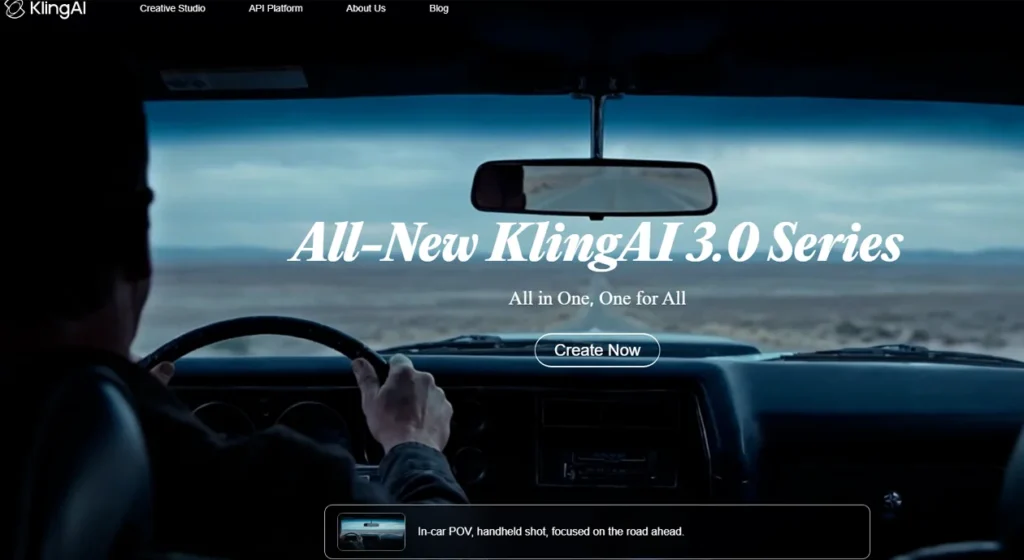
Kling AI is not a simple text-to-video tool. It has grown into what its developer calls an AI creative studio, covering text-to-video, image-to-video, native audio generation, motion transfer, AI avatars, virtual try-on, and a full developer API, all under one subscription. The platform targets a wide audience, but the users who consistently get the most out of it fall into three clear groups: social media content creators producing TikTok, YouTube Shorts, and Instagram Reels at volume; digital marketers who need product videos and short ads without a production budget; and indie filmmakers using it for previsualization and scene drafts.
Over 22 million users worldwide have collectively generated more than 168 million video clips on the platform. That scale is relevant because it means the free tier, the community, and the third-party tutorial ecosystem are all more developed than what you find with newer or smaller competitors like Pika or Luma AI.
Where Kling fits in a production workflow
Kling generates footage. It does not replace editing software. Most creators using it professionally treat Kling as the acquisition layer and bring the clips into DaVinci Resolve, Adobe Premier, or a similar editor for assembly, color, and final delivery. The native audio generation reduces one post-production step, but the output still needs review and often trimming. Users who expect a finished, broadcast-ready product from a single prompt will hit the inconsistency problem fast. Users who treat each generation as raw material to select from and edit tend to report much better results.
What Kling 3.0 Can Actually Do
The Kling 3.0 architecture, released February 2026, is built on what Kuaishou calls a unified multimodal engine that processes text, image, audio, and video together rather than in separate pipelines. The practical result is native 4K output, built-in multilingual audio support, and creative tooling that positions it as a viable alternative to Seedance 2.0, Sora 2, and Veo 3.1.
The core generation modes work as follows:
- Text-to-video takes a written prompt and generates a clip up to 15 seconds. Camera angle, motion type, and scene composition can all be described in the prompt or set through the interface controls.
- Image-to-video animates a still image with motion, depth, and camera dynamics. Image-to-video is widely regarded as Kling’s strongest capability, with the 3D face and body reconstruction technology reducing the warping distortion that is common in simpler tools.
- Video extension continues an existing clip beyond its original end point. Users on Reddit have consistently noted that quality tends to degrade past the first extension, particularly on clips with complex motion.
Audio generation uses roughly double the credits of standard video generation. A 10-second video with audio costs around 42 credits per second versus 7 credits per second for a basic standard mode clip. That cost differential is worth factoring in before choosing a plan.
Multi-Shot Storyboard: what makes it different
The Multi-Shot Storyboard feature, introduced with Kling 3.0, is the capability that most clearly separates this version from earlier iterations and from most competitors. It allows users to define 3 to 12 shots with individual prompts, camera directions, and transitions, and the model maintains character consistency, lighting, and scene continuity across all shots automatically. For anyone producing multi-scene social ads, trailers, or short narrative pieces, this removes the most time-consuming part of AI video production: manually stitching together clips that look like they belong in different films.
That said, it is not a one-prompt solution. Users on Reddit who tested Storyboard mode reported needing between three and six attempts per sequence to get a version they could actually use, particularly when the shots involved human characters moving across different environments. The character consistency holds well within a scene but can drift across shots that describe very different physical actions.
Motion Control: the feature no competitor has matched natively
Motion Control is Kling’s most distinctive feature. Upload a reference video of someone dancing, and the AI extracts that motion pattern and applies it to a completely different subject an animated character, a product, a pet. No other major AI video platform offers a native equivalent.
In the Kling 3.0 version of Motion Control, the system enables precise control of a character’s movements and facial expressions based on a reference image, enhancing facial consistency across scenarios and ensuring stable facial features and smooth expressions even in complex, multi-angle, long-duration motions.
In practical terms, one reference video can power multiple outputs. A single 10-second dance clip can serve as the motion source for an entire roster of characters, which makes the feature particularly efficient for creators building AI influencer content or producing character-driven social ads at scale. Motion Control requires a Standard plan or above and consumes approximately 35 to 50 credits per 5-second Pro-mode transfer, so the credit budget needs to be planned accordingly.
One documented limitation: the Motion Control Element Library uses only facial information for reference. It does not include clothing, hairstyle, makeup, or props. Creators expecting the full appearance of a reference subject to transfer will be disappointed. The movement transfers; the look does not.
How the Credit System Works and What It Actually Costs
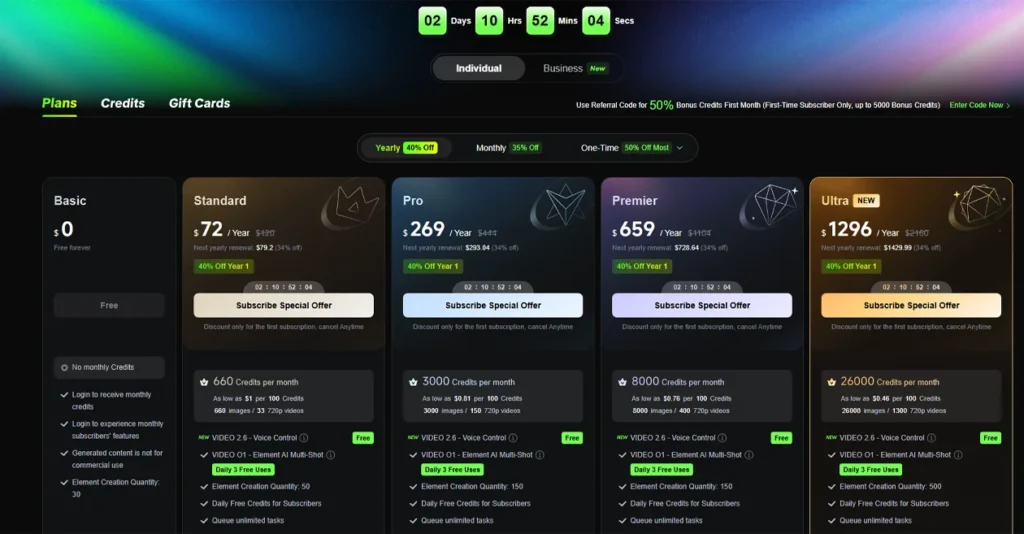
Understanding Kling’s pricing requires understanding the credit system first, because the plan names and monthly prices do not tell you how many videos you can actually make.
Kling AI does not charge a flat monthly fee for unlimited generation. You buy credits and spend them per second of video generated. Kling 3.0 costs range from 6 credits per second at 720p with no audio, up to 12 credits per second at 1080p with native audio. A realistic 10-second 1080p clip with three iterations costs around 360 credits.
| Plan | Monthly Price | Credits | Resolution | Notes |
|---|---|---|---|---|
| Free | $0 | 66/day | 720p, watermarked | No rollover, single queue |
| Standard | ~$10/month | 660/month | 1080p | Commercial rights included |
| Pro | ~$30/month | 3,000/month | 1080p/4K | Priority queue |
| Premier | Higher | Higher volume | 4K | Agency use |
| Ultra | $128/month | 3x+ Pro volume | 4K | No annual option |
On the free plan, you can realistically generate about 6 five-second clips or 3 ten-second videos per day. Free-tier outputs carry a watermark, and premium features including Motion Control are not accessible.
Three billing patterns from real user reports are worth knowing before you subscribe.
First, credits do not roll over. Subscription credits expire at the end of each billing month. If you generate 600 of your Standard plan’s 660 credits and forget the remaining 60, they disappear.
Second, the intro pricing is temporary. Each plan offers up to 30% off for the first billing period only, dropping back to the standard rate at renewal. The $10 per month Standard plan may come in at $6.99 for the first month before reverting. Multiple Trustpilot reviewers described this as a surprise at renewal.
Third, at least one user on Trustpilot reported being enrolled in a recurring subscription after making a one-time credit purchase, a complaint that appeared independently across several reviews in 2025 and 2026. These are not isolated reports; they form a pattern worth acknowledging before entering payment details.
What Real Users Got After Testing Kling on Actual Projects
The clearest picture of how Kling performs in practice comes from aggregating feedback across Reddit, Product Hunt, Trustpilot, and YouTube reviews from 2025 and 2026, rather than from any single account.
How users actually approached the tool
The most common documented use case was social media content production, specifically turning product images or AI-generated stills into short video clips for ads and organic posts. A second significant group used Kling for dance and motion transfer content via Motion Control, which became a dominant format on TikTok and Instagram in early 2026. A smaller but vocal group of indie filmmakers used the Storyboard feature for previsualization, building rough shot sequences to pitch to collaborators before committing to production.
What multiple users reported getting
Walk, run, and gesture animations in general feel very fluid, and running a clip of a person walking down a rain-slicked street showed very compelling results including the natural sway of a coat, the bounce of an umbrella, and the constantly shifting reflections on wet pavement, all with a strong sense of realism. This specific type of result realistic full-body motion in mid-complexity environmental scenes was the outcome multiple users pointed to independently as evidence the tool had crossed into genuinely usable territory for professional work.
What surprised users positively
The Kling 3.0 free tier’s allotment of 66 daily credits is the most generous among the major AI video generators, and it does not require a credit card to access. Users who expected a heavily gated free tier consistently reported this as a positive surprise, particularly those migrating from Sora, which shut down its public-facing web and app experience in April 2026. The ability to test the tool meaningfully before committing to a paid plan was noted repeatedly on Product Hunt and Reddit as a reason for choosing Kling over Runway or Veo, both of which have more restrictive free access.
What disappointed users
Inconsistency is the recurring complaint that overshadows everything else. Across multiple documented test runs, roughly 30 to 40 percent of prompts produced usable clips, with the rest showing artifacts or stutters. Users producing content at volume described a workflow that involves generating in batches and discarding a large proportion of outputs, which erodes the credit budget faster than the plan pricing suggests. Several users on Reddit noted that prompts which worked well in one session produced noticeably worse results the next day, making it difficult to build a predictable production routine around the tool.
Where Kling Falls Short Based on Documented User Feedback
The output quality that Kling demonstrates at its best is real. So are the problems that surface once you move past the free tier and start using the tool for regular production work. These are not edge cases pulled from a single frustrated reviewer. They are patterns that repeat across Trustpilot, Reddit, and Product Hunt spanning 2025 and 2026.
Output inconsistency
Inconsistency remains Kling’s most persistent structural weakness. Some prompts produce surprisingly smooth outputs while others get stuck at 99% rendering or yield disjointed visuals, with only 30 to 40 percent of prompts across multiple test runs producing usable clips. For creators who need to hit a delivery deadline, this failure rate forces a batch-generation approach that burns through credits faster than the plan pricing implies.
The inconsistency is not evenly distributed. Simple scenes with single subjects and clean backgrounds tend to perform well. Complex scenes involving multiple characters, crowded environments, or fine detail like text, hands, or dense fabric tend to fail more often. Users should expect lower consistency across runs and less control over fine details compared to tools like Runway Gen-4.5, which trades some of Kling’s motion realism for more predictable outputs across repeated generations.
Billing practices and customer support
Kling’s customer support is a significant weakness. The billing practices, including intro pricing that silently jumps at renewal and credits deducted for failed generations, have generated real frustration.
The Trustpilot record on this is unusually specific. One user subscribed to the Pro plan at $32.56 per month and after cancelling, requested a refund through three separate channels including email and Discord. The Discord billing support channel was locked by a moderator who admitted having no access to billing systems. On June 5, 2026, Kling AI attempted to charge the card again despite the subscription being cancelled. The user noted this appeared to be a common practice based on multiple similar complaints.
A separate user was banned without explanation by what appeared to be an automated system, with credits still remaining in the account and no response to appeals. This type of account action without recourse is particularly damaging for anyone relying on the platform for ongoing client work.
Content censorship
Kling’s content moderation policies operate under strict rules aligned with Chinese government regulations, preventing the generation of content related to sensitive political topics, protests, or criticism of the government. For most commercial and entertainment use cases this will not come up, but journalists, documentary makers, and anyone working on politically themed content will encounter hard blocks with no clear explanation or override.
Data privacy
As a Kuaishou product, user content may be processed under Chinese data law. Several reviewers flagged this in 2026 as a concern for enterprise users and anyone generating content that involves proprietary brand assets, unreleased products, or client-owned intellectual property. This is not a theoretical risk; it is a documented consideration that has caused some agency teams to keep Kling in their personal workflow while avoiding it for client deliverables.
Kling AI Pros, Cons, and What Sets It Apart From Competitors
Pros
These strengths come from recurring positive feedback across Product Hunt, Reddit, and review platforms in 2025 and 2026, not from Kling’s official feature list.
- Motion realism in human subjects Independent reviewers consistently rate Kling the strongest tool for human-subject video in 2026. The proprietary diffusion-based Transformer architecture combined with a 3D Variational Autoencoder means the model understands how bodies move through space, how fabric drapes, and how light plays across skin as a continuous flow rather than frame by frame. Users on Product Hunt and Reddit who tested it against Pika and Luma AI repeatedly cited this as the clearest differentiator.
- The most generous free tier among major AI video generators. The 66 daily free credits require no credit card and represent the best free access available across the major AI video platforms. Seedance 2.0 offers a very limited free tier. Veo 3.1 requires an Ultra subscription tier to access. This makes Kling the most practical tool to evaluate properly before committing money.
- Motion Control with no native equivalent elsewhere. Multiple independent reviewers in 2026 confirmed that no competing platform offers a native motion transfer feature comparable to Kling’s. The ability to extract movement from a reference video and apply it to a different subject in a single generation step remains exclusive to Kling as of mid-2026.
- Competitive cost per second. At roughly $0.10 per second of generated video, Kling 3.0 is the cheapest premium AI video model in 2026. For comparison, Veo 3.1 starts at $0.15 per second in fast mode, and Sora 2 API pricing ran at $0.75 per second before its shutdown.
- Rapid development pace. Users across Product Hunt consistently noted that Kling releases meaningful upgrades at a pace faster than most competitors. The jump from 2.1 to 2.6 to 3.0 within a single calendar year brought native audio, Motion Control, Storyboard mode, and 4K output in sequence. Creators who stay current with the platform tend to benefit from features that were not available when they first subscribed.
Cons
These are sourced from documented complaints on Trustpilot, Reddit, and Product Hunt from 2025 and 2026.
- Output inconsistency at volume. The 30 to 40 percent usable clip rate reported across multiple test accounts means that credit budgeting based on plan pricing alone is unreliable. Real output volume is significantly lower than what the credit numbers imply, because a meaningful proportion of generations need to be discarded.
- Billing practices that erode trust. The billing practices including intro pricing that silently reverts at renewal and credits deducted for failed generations prevent a higher overall score from most independent reviewers, despite strong technical performance. The absence of reliable customer support means these issues rarely get resolved once they occur.
- Audio generation doubles the credit cost. The catch with native audio is that it uses roughly double the credits of standard video generation. Users who subscribe to a Standard or Pro plan without accounting for this will find their credits running out significantly faster than expected once they start using audio regularly.
- Character consistency degrades across complex multi-shot sequences. While the Storyboard feature holds character appearance well within individual shots, multiple Reddit users noted visible drift when characters moved through very different physical environments or actions across a sequence. Runway Gen-4.5 handles this more consistently based on side-by-side comparisons posted by users on X in early 2026.
- Data jurisdiction and censorship restrictions. For enterprise users and those working with politically sensitive content, the combination of Chinese data jurisdiction and government-aligned content moderation is a real operational constraint, not just a theoretical one.
What sets Kling apart from competitors
This is not a repeat of the pros. The specific question here is what Kling does that its direct competitors cannot match.
Motion Control is the clearest answer. The ability to upload a reference video, extract the motion pattern, and apply it to a completely different subject with no equivalent native feature on any other major platform drove a viral explosion in early 2026, spawning millions of dance-transfer videos across TikTok and Instagram. Runway has a motion brush for guiding camera movement. Seedance 2.0 supports camera replication from a reference video. Neither does what Kling’s Motion Control does at the subject level.
The Multi-Shot Storyboard is the second differentiator, though less exclusive. Defining 3 to 12 shots with individual prompts and maintaining character consistency, lighting, and scene continuity across all shots automatically in a single generation batch is a workflow advantage that users producing short narrative content consistently flagged as the reason they chose Kling over tools that require per-clip generation and manual assembly.
For a user who does not need either of those features, Kling is still a competitive tool on motion quality and price, but the differentiation becomes less clear. At that point the choice comes down to output style preferences and tolerance for billing friction.
How Kling Compares to Runway, Veo, and Seedance in Real Use
Kling vs Runway Gen-4.5
Runway Gen-4.5 remains the professional standard when you need granular creative control, including camera moves, motion brush, and reference-driven character consistency. In side-by-side comparisons shared on X in 2026, Runway produced more consistent outputs across repeated generations of the same prompt, making it the more reliable tool for client-facing work where variation is costly. Kling produces higher motion realism in human subjects, particularly in full-body movement scenes, but the output variance means you may need more generations to get a keeper. For studios with predictable production pipelines, Runway’s consistency advantage matters more than Kling’s motion ceiling. For solo creators comfortable with batch generation and selection, Kling’s combination of motion quality and lower cost per second tips the balance.
Kling vs Google Veo 3.1
Veo 3.1 leads on prompt adherence, native audio, and 4K output in both landscape and portrait orientations, making it the strongest all-rounder for narrative scenes and establishing shots. The tradeoff is cost. Veo 3.1 starts at $0.15 per second in fast mode, compared to Kling’s roughly $0.10 per second, and access requires navigating Google’s platform infrastructure, which several reviewers noted is less straightforward than Kling’s interface. For creators who prioritize cinematic accuracy and prompt fidelity over price and are producing lower volumes, Veo 3.1 is the stronger tool. For high-volume social content where the price differential accumulates quickly, Kling holds the practical advantage.
Kling vs Seedance 2.0
ByteDance released Seedance 2.0 three days after Kling 3.0 dropped in February 2026, which is not a coincidence given the competitive pressure between the two companies. Seedance 2.0 still requires an external audio file to be provided as input, while Kling 3.0 generates audio natively from text prompts in five languages with lip-sync accuracy. For video creators who need to produce multilingual content, this is a concrete operational difference that affects how many tools and how many steps the workflow requires. Seedance holds an advantage in multi-reference input, supporting up to twelve files per generation, which gives more control over complex scenes with multiple reference materials. Kling wins on audio workflow simplicity and Motion Control. Seedance wins on reference input flexibility and director-level camera replication.
Who Should Use Kling AI and Who Should Look Elsewhere
Use Kling if:
- You produce short-form social content at volume and need realistic human motion without a per-clip price that compounds painfully at scale
- Motion Control is relevant to your workflow dance transfers, character animation, AI influencer content
- You are evaluating AI video tools and want the best free tier available to test properly before committing
- You are migrating from Sora and need a comparable quality level at a lower ongoing cost
- You produce multilingual video content and want native audio sync without a separate audio workflow
Look elsewhere if:
- You need consistent, predictable output across repeated generations for client deliverables without spending credits on discarded clips Runway Gen-4.5 handles this better
- You work on politically sensitive, documentary, or journalistic content where censorship blocks and content restrictions would affect your output
- Your organization has data jurisdiction requirements that prevent processing content on servers subject to Chinese law
- Reliable, responsive customer support is a baseline requirement for your subscription multiple documented cases from 2025 and 2026 show that Kling’s billing and account support is not dependable
- You need the absolute ceiling on prompt adherence and cinematic accuracy and cost is secondary Veo 3.1 leads on those dimensions
The honest position is that Kling AI is genuinely the most capable AI video generator available at its price point in mid-2026, measured by motion quality, feature breadth, and cost per second. The reason it does not earn an unconditional recommendation is that the billing practices, output inconsistency, and data concerns are real enough to affect real decisions. Knowing exactly which category of user you fall into before subscribing is the practical way to navigate that.
Is Kling AI free to use?
Kling AI offers a free tier with 66 daily credits that does not require a credit card to access, which is the most generous free allowance among the major AI video generators.
How does Kling AI compare to Runway Gen-4.5?
The two tools optimize for different things. Kling leads on motion realism in human subjects and costs roughly $0.10 per second of generated video, making it more practical for high-volume social content production. Runway Gen-4.5 remains the professional standard when you need granular creative control, including camera moves, motion brush, and reference-driven character consistency across scenes. Users who need predictable, consistent output across repeated generations for client-facing work tend to favor Runway. Users who prioritize motion quality and lower cost per clip tend to favor Kling.
What is Kling AI best used for?
Kling AI performs best in three documented use cases. First, short-form social media content where realistic human motion is the priority, particularly for TikTok, YouTube Shorts, and Instagram Reels. Second, Motion Control projects where a reference video’s movement is transferred to a different character or subject, a feature no competing platform offers natively as of mid-2026.
Third, multilingual video production where native audio generation in five languages eliminates the need for a separate audio workflow. It is less suited to projects requiring highly consistent output across many generations or to content involving politically sensitive subject matter.
What are the main limitations of Kling AI?
Output inconsistency is the most documented limitation, with roughly 30 to 40 percent of prompts across multiple test runs producing usable clips and the rest showing artifacts or stutters.
Beyond that, billing practices including silent intro-price reversions at renewal, credits deducted for failed generations, and reported unauthorized charges after cancellation have generated repeated complaints on Trustpilot and Reddit through 2025 and 2026. Audio generation also uses roughly double the credits of standard video generation, which catches users off guard when budgeting for a plan. Data privacy concerns related to Kuaishou’s Chinese data jurisdiction are an additional constraint for enterprise users.
Similar AI Tools

Recraft AI Review The Free SVG Converter , logo generator and Image Generator


Pika Ai Review What It Does Well and Where It Falls Short
