
Recraft AI Review The Free SVG Converter , logo generator and Image Generator
Recraft AI is a browser-based generative design platform built specifically for professional designers, marketers, and brand teams who need more than just pretty images from a text prompt. Unlike general-purpose AI image generators, Recraft focuses on native vector output, brand consistency, and readable text inside generated visuals. Since launching in 2022 and reaching over 3 million users, it has carved out a clear niche as a free AI logo generator, a scalable SVG creator, and a full design workspace. This review covers everything you need to know, including features, pricing, real limitations, and how it compares to tools like Midjourney, Adobe Firefly, and Canva AI.
What Is Recraft AI and How Did It Get Here
Recraft was founded in 2022 with a specific goal: build an AI design tool that fits how professional designers actually work, not how hobbyists prompt for art. Most AI image tools that launched around that time were optimized for generating striking visuals from short prompts. Recraft took a different path, prioritizing scalable vector output, brand style control, and design system compatibility.
The company has been backed by Accel and Khosla Ventures with $42 million across two funding rounds, including a $30 million Series B in May 2026. That funding came at a moment when independent testing confirmed the quality of its core model. On the Hugging Face Text-to-Image Arena, Recraft V4 held first place since October 2024, beating DALL-E by 188 ELO points on a 1,000-1,200 scale, a gap considered statistically enormous in that benchmark context.
The platform went through a significant evolution from its earlier V3 model to V4 and now V4.1. The V3 model marked an important milestone by moving beyond random image generation based on text prompts alone. It was built to understand structure, layout, and composition, which is a fundamentally different design approach from the tools that came before it.
Recraft now has over 3 million users, with more than 350 million AI images generated on the platform. The hype cycle has settled, which means you are now evaluating the real, everyday product rather than launch-day excitement.
Key Features of Recraft AI
Native SVG Vector Generation
This is the feature that separates Recraft from nearly every other AI image tool on the market. Recraft is the only AI generator capable of producing clean SVG vector files alongside perfectly readable text in generated images.
Why does that matter in practice? Most AI image generators have a fundamental limitation: they cannot make actual vector files. When you ask for a logo, you get a PNG. Tools like Adobe Illustrator’s Image Trace or Inkscape take a raster image and convert it to vector paths after the fact, which works but produces bloated, messy SVGs with hundreds of unnecessary anchor points. Recraft V4 Vector generates cleaner path structures because it starts in vector space from the beginning.
Recraft’s SVG output is cleaner than any tracing-based tool, including Vector Magic and Illustrator’s Image Trace. Paths are named, layers are grouped logically, and stroke widths are consistent. You can paste directly into Figma via the clipboard or drag and drop the SVG file into your workflow.
That said, it is not perfect. Some users report that generated vectors can emerge as collections of excessive anchor points and redundant layers, with professional designers spending an hour or more cleaning up a single file before it is ready for client delivery. This is worth knowing before you assume every output is production-ready out of the box.
Logo and Icon Generation
Recraft supports full vector generation, enabling the creation of scalable graphics like icons and logos. The interface is user-friendly and incorporates AI to enhance the creative process.
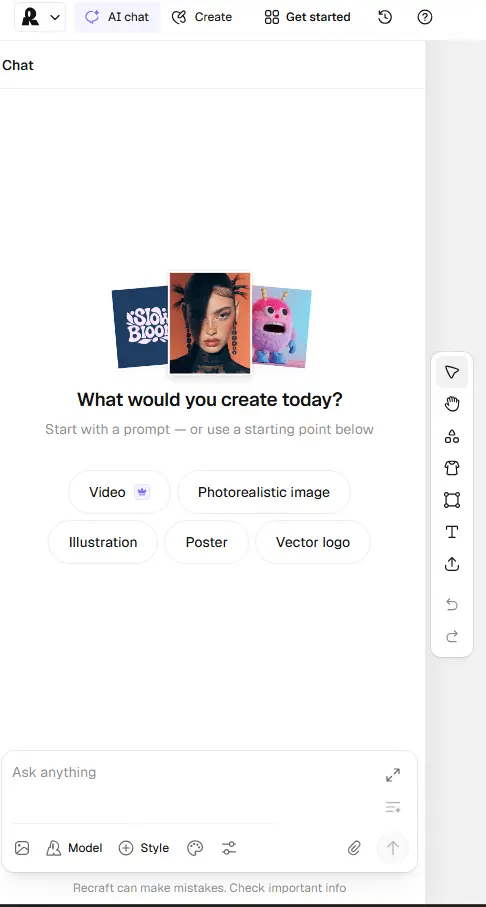
Teams are using it to design entire sets of app icons or to quickly brainstorm different logo concepts without spending days sketching. The ability to generate a whole series of consistent images for a marketing campaign is a significant time-saver.
As a free AI logo generator, Recraft’s free tier gives you access to logo creation tools without paying. The catch, covered fully in the pricing section, is that free-tier images are public and carry no commercial license.
Brand Style Locking and Palette Control
What sets Recraft apart is its ability to train custom brand styles from reference images. Professional graphic designers who regularly need editable SVG files get the clearest value, since native vector output removes the raster-to-vector conversion step entirely. Marketing agencies managing multiple client brands also benefit significantly.
Style locking works by letting you upload reference images, define a color palette, and set line weight preferences. Every subsequent generation then respects that visual language. Recraft’s Style Sets allow you to maintain a consistent design across all assets, making it well-suited for teams working within brand guidelines. Midjourney’s character and style reference tools are an improvement in that product, but they still do not offer the level of consistency that Recraft provides for branding projects.
Readable Text Rendering Inside Images
Text inside AI-generated images has been a known weak point across almost all major tools. Recraft is the only model that generates images with full sentences and readable paragraphs, while Midjourney and DALL-E typically stop at two to three words before text degrades.
This directly affects anyone creating posters, social media ads, marketing banners, or presentation graphics where text needs to be legible, not decorative. Recraft gives users full control over font size, alignment, and positioning, enabling the creation of posters, social ads, or presentations with clean professional typography generated alongside the visuals.
Infinite Canvas Workspace
Recraft’s infinite canvas approach offers a fluid, Figma-like experience that allows for iterative design work. You can quickly drag, drop, and modify elements as needed. This is a meaningful practical difference from tools that operate as single-prompt, single-output generators. You can build out a full design system within one workspace session rather than constantly exporting and reimporting between tools.
Mockup Generation
Recraft includes a mockup feature that lets users generate and customize realistic previews of designs across various products, enhancing efficiency for client presentations and brand rollouts. This is particularly useful for freelancers who need to show clients how a logo or graphic will look on a t-shirt, mug, or website before final delivery.
Background Removal and Editing Tools
Recraft combines essential editing tools including background removal, AI erasing, object replacement, and image upscaling into its platform. This means designers no longer need Photoshop or multiple tools for the finishing touches on many common tasks.
API Access
For enterprises and developers, Recraft provides API integration. This allows businesses to automate image creation, build branded workflows, and scale design production at the enterprise level. The platform also offers node-based workflows in beta, Figma and Framer plugins, and video generation from over 20 models, along with a commercial API for programmatic access.
Recraft AI Pricing Plans
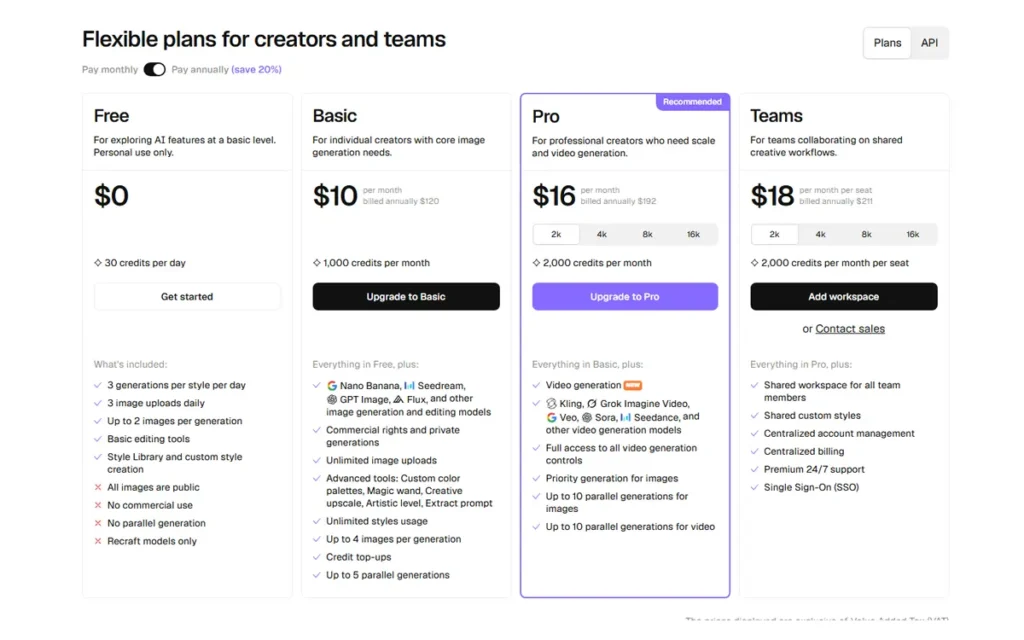
Recraft AI operates on a freemium model, offering a Free plan for personal use and two paid tiers, Pro and Teams, for professional and collaborative commercial use. Here is a full breakdown:
Here’s a comprehensive table of Recraft AI’s current pricing plans:
| Plan | Monthly Price (Annual Billing) | Credits | Best For | Key Highlights |
|---|---|---|---|---|
| Free | $0 | 30/day (~900/mo) | Personal exploration | Basic generation, 2 images/prompt, 3 uploads/day. Recraft owns content; no commercial rights. Public images only. |
| Pro Basic | $10/mo | 1,000/mo | Freelancers with light usage | Full content ownership, commercial rights, private generation, unlimited uploads, up to 4 images/prompt |
| Pro Mid | $20/mo | 4,000/mo | Active freelancers & solo creators | All Pro Basic features, 4x the credits at 2x the price |
| Pro Premium | $48/mo | 8,400/mo | High-output professionals | Priority queue, 10 concurrent jobs, all Pro features |
| Teams | ~$55/seat/mo (estimated) | 9,000/seat | Design agencies (3+ people) | Style sharing, admin controls, real-time collaboration, centralized billing. Official pricing requires sales contact. |
| Enterprise | Custom quote | Custom | Large orgs & API automation | SSO, audit logs, SLAs, API access, custom support, brand asset management |
A few important notes:
- The advertised monthly rates ($10, $20, $48) are only available with annual billing. True month-to-month pricing is approximately 20% higher (e.g. ~$12/mo for Pro Basic).
- Monthly subscription credits do not roll over — unused credits expire at month-end. However, separately purchased top-up credits never expire.
- API usage is billed separately: $0.04 per raster image and $0.08 per vector image (Recraft V3).
- Teams pricing is not publicly disclosed and requires direct contact with sales at help@recraft.ai.
Who Should Use Recraft AI
Recraft is not a universal tool. Understanding who gets real value from it, and who does not, is more useful than a blanket recommendation.
It fits well for:
- Graphic designers who regularly need SVG output Professional graphic designers who regularly need editable SVG files get the clearest value, since native vector output removes the raster-to-vector conversion step entirely.
- Marketing agencies managing multiple client brands The brand style locking feature means you can maintain separate visual identities for different clients inside one workspace without starting from scratch on each project.
- Small business owners building brand materials. Logo generation, icon creation, and mockup previews in one tool covers most of what a small brand needs at early stage.
- Developers building automated design pipelines Recraft provides API access to V4, which means developers and teams can integrate the model into their own products, tools, or automated workflows.
- Freelance illustrators who need brand-consistent asset sets. Recraft AI is most useful for graphic designers, brand identity specialists, marketing teams, and freelance illustrators whose work already involves structured, repeatable visual output.
It is a poor fit for:
- Users who need photorealistic portraits or cinematic imagery. For photorealistic portraiture, Midjourney and FLUX are still superior.
- Anyone who needs mobile-first access. Users report that mobile devices and laptops cause buggy performance, with display issues, import failures, and the lasso tool occasionally triggering accidental page refreshes. The tool works best on a high-end device with a large monitor.
- Businesses that cannot tolerate downtime. In February 2026, the platform experienced a complete service failure lasting over 5 days, during which users could not access any of their generated content, with no official announcement made about the outage. If your production workflow depends on 24/7 availability, that incident is a relevant data point.
- Users who need a simple, fast tool without a learning curve. The number of features can intimidate users coming from tools like Midjourney, where a single prompt is all that is needed to get started.
Recraft AI as a Free AI Logo Generator
One of the most searched use cases for Recraft is logo creation, and it is genuinely one of the stronger applications for the tool. The combination of native SVG output, style locking, and text rendering puts it ahead of most AI logo generators that simply produce a PNG file and call it done.
Recraft is not just for designers. Common use cases include branding and marketing, specifically creating logos, ad banners, and product mockups that follow strict brand guidelines, ensuring consistency across websites, social media, and marketing campaigns.
In practical terms, here is how logo creation works inside Recraft:
- Open the infinite canvas workspace and start a new project.
- Write a text prompt describing the logo concept, including style, color palette, and any iconography.
- Select the vector output option to generate an SVG file rather than a raster image.
- Use the style lock feature to lock in brand colors and visual language before iterating.
- Apply mockup generation to preview the logo on real product surfaces like packaging, apparel, or a website header.
- Export directly as SVG for use in Figma, Illustrator, or your codebase.
What prompts work better for logos
Shorter, more structured prompts outperform long descriptive ones. A documented case study of Mindset Design Studio shows the agency using four-word prompts to achieve consistent branding results across client projects. The model responds better to design-language descriptions such as “minimal geometric tech icon, navy and white” than to narrative descriptions.
Where it falls short as a logo generator
The free plan is functional for exploration, but it is not suitable for client delivery. All free-tier logos are posted publicly, and commercial use is not permitted without a paid plan. Additionally, generated vectors can sometimes emerge as chaotic collections of excessive anchor points and redundant layers, requiring professional designers to spend an hour or more cleaning up a single file before it is ready for client delivery.
Compared to dedicated logo tools like Looka or Tailor Brands, Recraft gives you far more creative control and genuine vector output, but it also requires more prompt skill and post-processing time. Looka is faster for non-designers who need something finished quickly. Recraft is better for designers who want a starting point they can actually edit in Illustrator or Figma.
Recraft AI as a Free AI SVG Converter
Beyond generating SVGs from prompts, Recraft also includes a vectorization feature that converts existing raster images into SVG files. This positions it as a free AI SVG converter, which is a workflow that previously required either manual tracing in Illustrator or third-party tools like Vector Magic.
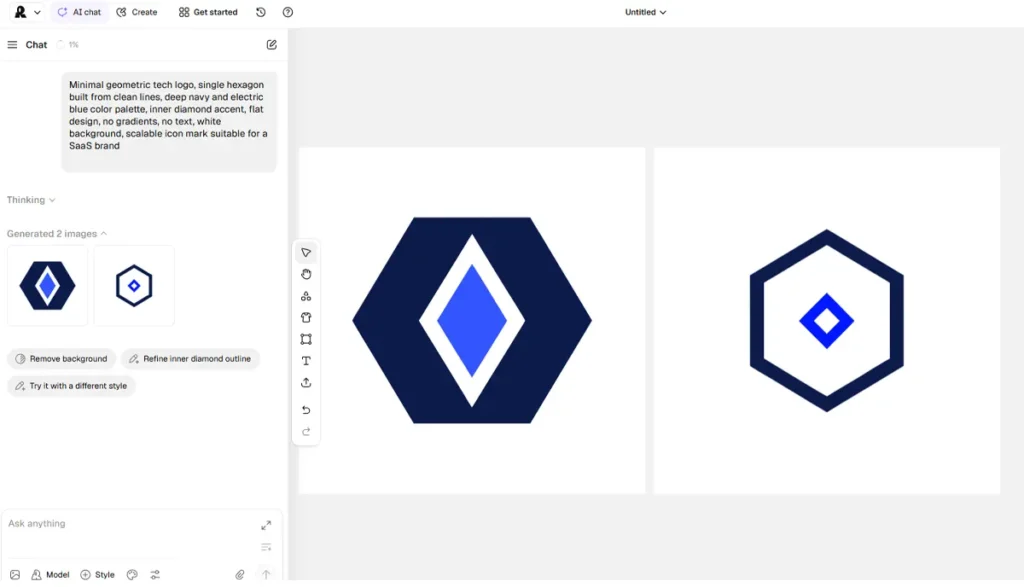
Unlike Midjourney, which relies on third-party tools to convert images into vectors, Recraft natively handles vector exports. This removes an entire step from the design workflow for anyone regularly working with logos, icons, or print-ready assets.
Native SVG vs. raster-to-vector tracing: why the difference matters
When you use Illustrator’s Image Trace or a similar tool, the software looks at pixels and tries to guess the underlying shapes. The result is often a technically valid SVG that is practically unusable, filled with hundreds of redundant anchor points, inconsistent stroke widths, and unnamed layers.
Recraft’s SVG output is cleaner than any tracing-based tool. Paths are named, layers are grouped logically, and stroke widths are consistent. You can paste directly into Figma via the clipboard or drag and drop the SVG file into your workflow.
FLUX, Midjourney, DALL-E, and similar models produce raster images. You can export them as high-resolution PNGs and auto-trace them, but the result will not be as clean as native vector output. Recraft V4 Vector is better for logos and icons specifically, while those tools are better for photorealistic or highly detailed images.
When to use Recraft as an SVG converter
- Converting a simple logo or icon from PNG to a clean, editable SVG
- Preparing assets for print that need to scale to large formats without quality loss
- Building a UI component library where every icon needs to be editable in Figma
- Generating product icons for an app where file size and scalability both matter
The free plan does allow vectorization, making it accessible without a subscription. However, free-tier output is public, so avoid running confidential client assets through it unless you upgrade to a paid plan first.
Recraft AI vs. Competitors
Recraft occupies a specific position in the AI design tool landscape. It is not trying to replace Midjourney for artistic image generation, and it is not trying to be Canva for non-designers. Understanding where it wins and where it loses against each competitor helps you decide whether it fits your workflow.
Recraft AI vs. Midjourney
Compared to Midjourney, Recraft wins on structured design output, vector support, and brand consistency. But Midjourney still produces more visually striking, emotionally resonant imagery. They are not really competing for the same use case.
Recraft V4 wins outright on vector output. Vector output is a practical advantage for any professional design workflow. Midjourney produces raster images exclusively. You can upscale them, but you are still working with pixels, not paths.
Where Midjourney still leads: photorealistic portraits, cinematic concept art, and any output where emotional impact and visual drama matter more than practical editability.
Recraft AI vs. Adobe Firefly
Compared to Adobe Firefly, Recraft is considerably more powerful for standalone generation and vector workflows. But Firefly integrates natively with Photoshop and Illustrator. If you are already Adobe-native, that integration value is hard to ignore.
Firefly also benefits from Adobe’s commercial safety guarantees, since its training data is licensed. Recraft has earned AIUC-1 certification, but Adobe’s legal clarity remains stronger for enterprise procurement teams with strict IP requirements.
Recraft AI vs. Canva AI
Canva’s AI tools generate raster images. They are accessible and beginner-friendly but do not output native vector files.
Compared to Canva’s AI tools, Recraft is significantly more capable for professional design work, though Canva is simpler for non-designers who just need social graphics fast.
If your team needs social media graphics produced quickly with minimal design skill, Canva wins on speed and ease. If your team needs scalable, brand-consistent assets that are editable after generation, Recraft wins on output quality.
Comparison Table
| Feature | Recraft AI | Midjourney | Adobe Firefly | Canva AI |
|---|---|---|---|---|
| Native SVG output | Yes | No | No | No |
| Brand style locking | Yes | Partial | Partial | No |
| Readable text in images | Yes | No | Partial | Partial |
| Free tier available | Yes | No | Yes (limited) | Yes |
| Commercial license on free tier | No | N/A | Yes | Yes |
| Photorealistic portraits | Weak | Strong | Moderate | Weak |
| Native app integrations | Figma, Framer | Discord | Photoshop, Illustrator | Standalone |
| Best suited for | Brand assets, SVGs, logos | Art, concept work | Adobe users | Non-designers |
Real Pros and Cons of Recraft AI
Every review of Recraft mentions the same standout capabilities. But the limitations are equally consistent across real user feedback, and they are specific enough to affect real decisions.
What Recraft Does Well
- Recraft is the only AI model in the world that natively generates production-ready vector SVGs, with real Bezier curves editable in Illustrator or Figma, not raster-to-vector conversions.
- One reviewer noted that their workflow went from bouncing between three or four different tools just to finish a single visual, to consolidating everything in Recraft, with consistent custom styles and editable SVG output cited as the standout features.
- Text rendering inside images is significantly more reliable than Midjourney or DALL-E for design use cases requiring actual words.
- The free tier is permanent, not a time-limited trial, which gives genuine time to evaluate the platform.
- A documented case study of Anatomie Fashion reports a 20,000x design output increase after adopting Recraft into their production workflow. That is a company-provided number and should be read with that context, but the directional signal from agencies using Recraft for high-volume brand work is consistent.
Where Recraft Falls Short
These are documented limitations that could genuinely affect whether the tool is right for you:
- SVG cleanup is often required. Users report that generated vectors can emerge as chaotic collections of excessive anchor points and redundant layers, with professional designers spending significant time cleaning up files before they are ready for client delivery. Native SVG does not always mean immediately usable SVG.
- The February 2026 outage was a serious reliability failure. In February 2026, the platform experienced a complete service failure lasting over 5 days. During this time, users could not access any generated content, which is the core function paid subscribers are relying on. A five-day outage with no clear communication is not a minor inconvenience for anyone with client deadlines.
- Credits do not roll over and cannot be topped up on the free plan. Daily credits expire at the end of each day. You cannot purchase additional credits on the Free plan. For active users, this means unused capacity is simply lost.
- Mobile experience is unreliable. Users report that mobile devices and laptops cause buggy performance, with display issues, import failures, and accidental page refreshes triggered by the lasso tool. The tool performs best on a high-end device with a large monitor.
- Prompt consistency can be unreliable. The main complaints from users include inconsistency in prompt handling, weak small details, and limits with layered or more complex artwork.
- Customer support has drawn criticism. Trustpilot reviews characterize customer support as ineffective, with the suggestion that the company is more focused on marketing and UI changes rather than fixing core functionality issues. This is a subjective claim, but it appears in enough independent reviews to note.
Summary of Pros and Cons
| Pros | Cons |
|---|---|
| Only tool with true native SVG output | SVG files often need manual cleanup |
| Brand style locking across all outputs | Credits don’t roll over |
| Readable text rendering in images | Free plan images are public |
| Permanent free tier | 5-day outage in February 2026 |
| Figma and Framer plugin support | Mobile experience is buggy |
| Infinite canvas, Figma-like workspace | Complex prompts produce inconsistent results |
| API access for automation | No commercial license on free plan |
Is Recraft AI Worth It
The answer depends entirely on what you actually need from a design tool.
If you are a graphic designer, brand consultant, or marketing agency whose work regularly involves logos, icons, scalable brand assets, or anything that needs to end up as an editable vector file, Recraft fills a genuine gap. No other AI image generator has addressed the problem of generating true vector graphics directly from text prompts as effectively as Recraft. The workflow reduction is real for designers who previously split their time across multiple tools just to complete a single asset.
If you are a solo creator or small business owner testing the platform, the free tier is a legitimate starting point. Fifty daily generations is enough to evaluate whether the output quality meets your needs before spending anything. Just go in knowing that free-tier outputs are public and carry no commercial license.
If you are evaluating it for a business-critical workflow where downtime is not acceptable, the February 2026 outage is relevant context. The hype phase is over. You are evaluating the real product now, and the audience settling back toward genuine repeat users rather than curious onlookers is a reasonable signal of what the platform actually delivers day to day.
If your primary need is photorealistic imagery, emotional visual impact, or cinematic art direction, Midjourney remains the stronger choice for those specific outputs. Recraft and Midjourney are not really competing for the same use case. Choosing between them is mostly a question of what kind of output your work requires.
Conclusion
Recraft AI is a focused, professionally oriented design tool that solves a real problem: generating scalable, brand-consistent vector assets directly from AI without the manual tracing step. Its native SVG output, brand style locking, and readable text rendering inside images are capabilities no other mainstream AI image generator currently matches at the same level.
The limitations are real and worth taking seriously before committing to a paid plan. SVG files sometimes need cleanup, credits expire daily without rollover, the mobile experience remains unreliable, and the February 2026 outage demonstrated that production-critical reliance on the platform carries some risk.
For designers and brand teams who need a free AI logo generator, a free AI SVG converter, and a structured design workspace in one browser-based tool, Recraft is the most purpose-built option currently available. For everyone else, the right tool depends on the specific output your work demands.
Similar AI Tools

Runway Gen-3 Alpha Review 2026 What It Actually Delivers and Where It Costs You


Adobe Firefly Review Free AI Text to Image Generator, Video Tools, and Everything You Need to Know
