

GitHub Copilot in 2026 What It Can Do, What It Costs, and Its Limits
GitHub Copilot is an AI coding assistant that works inside development environments such as Visual Studio Code, Visual Studio, JetBrains IDEs, Xcode, and Eclipse, as well as GitHub itself, the terminal, and GitHub’s standalone Copilot app. It can autocomplete code, answer questions about a project, edit multiple files, run development commands in agent mode, review code, and delegate longer tasks to a cloud agent.
There is a free plan with 2,000 code completions per month and limited chat and agent usage. Paid individual plans currently start at $10 per month for Copilot Pro. The biggest advantage is how deeply Copilot fits into existing GitHub and IDE workflows. Its biggest limitation is that chat and agent workloads now consume GitHub AI Credits, so the real amount of agent work included in a subscription varies with the model, context size, and task complexity.
GitHub Copilot Quick Facts
| Category | Details |
|---|---|
| Tool type | AI coding assistant and coding agent |
| Main purpose | Generate, understand, edit, debug, and review code |
| Best for | Developers already working in GitHub and mainstream IDEs |
| Beginner friendly | Yes, but generated code still needs review |
| AI Agent | Yes — IDE agent mode plus paid cloud agent |
| Code autocomplete | Yes |
| Multi-file editing | Yes |
| Codebase understanding | Yes, with support varying by IDE |
| Terminal access | Yes, through agent mode and Copilot CLI |
| Supported models | OpenAI, Anthropic, Google, Microsoft, xAI, Moonshot and others |
| Free plan | Yes; 2,000 completions plus limited AI usage |
| Individual paid plans | Pro $10, Pro+ $39, Max $100 per month |
| Team plans | Business $19/user/month; Enterprise $39/user/month |
| Main platforms | GitHub, VS Code, Visual Studio, JetBrains, Xcode, Eclipse, CLI |
| MCP | Supported on several agent-capable IDEs |
| Privacy controls | Training, public-code and organization policies; no single “Privacy Mode” toggle |
GitHub’s current feature matrix shows that not every feature is identical across every editor. VS Code generally has the broadest coverage, while features such as workspace indexing, edit mode, next-edit suggestions, or MCP may differ elsewhere.
What Is GitHub Copilot?
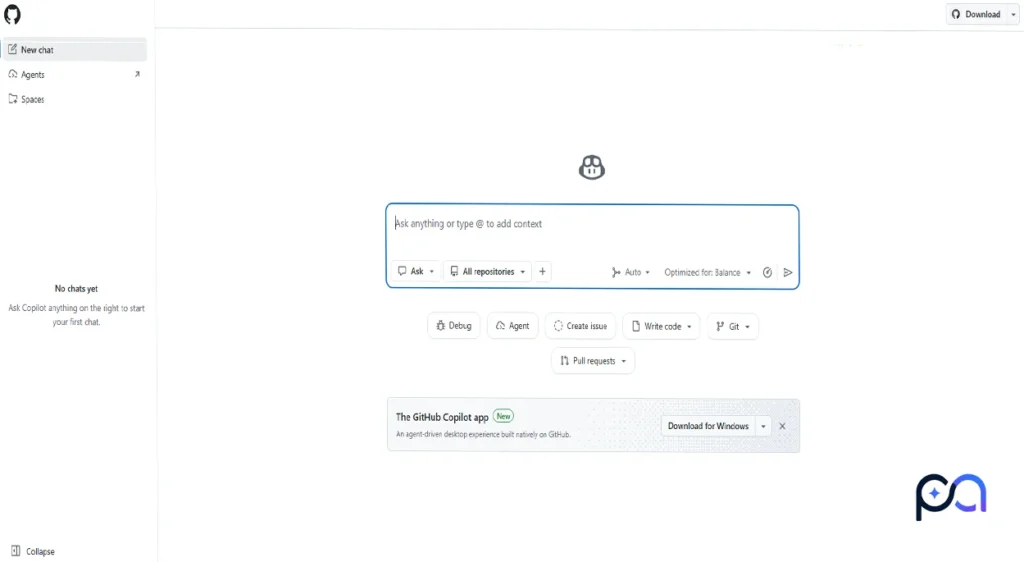
GitHub Copilot is not a code editor like Cursor. It is an AI development service that plugs into existing editors and GitHub workflows. A VS Code user can continue working inside VS Code rather than moving an entire project into another editor.
Copilot can use the file you are viewing, selected code, workspace information, repository context, chat history, and other permitted context to answer questions or propose changes. GitHub also now offers a separate Copilot desktop app for Windows, macOS, and Linux for managing agent-driven work, but that app does not change the fact that the core Copilot product works across multiple development environments.
What Can You Do With GitHub Copilot?
1. Write Code
Copilot can generate functions, components, tests, queries, scripts, configuration files, documentation, and other development code from comments or natural-language instructions. Inline suggestions can also complete code while you type.
2. Edit Existing Code
You can ask it to refactor a function, change an API, fix types, update error handling, or modify existing logic instead of generating everything from scratch.
3. Understand a Codebase
Copilot can explain files and relationships between parts of a project. Workspace indexing is currently supported in VS Code, Visual Studio, JetBrains, and Eclipse, although support varies by environment.
4. Edit Multiple Files
Copilot Edits can apply one request across several files. In edit mode, you control the working set; in agent mode, Copilot can determine which files need modification itself.
5. Use Agent Mode
Agent mode accepts a higher-level objective, finds relevant files, edits them, proposes or runs terminal commands, inspects results, and can iterate when tests or builds fail. Commands normally remain subject to approval unless your configuration allows automatic execution.
There is also a cloud agent on paid plans. This works asynchronously against a GitHub repository and can research a task, write code, run work in an isolated environment, and produce changes or a pull request while you do something else.
6. Debug Errors
You can provide compiler errors, test failures, logs, or broken code and ask Copilot to investigate. Agent mode is particularly useful when a fix requires examining several files and repeatedly running tests.
7. Work From the Terminal
Copilot CLI brings the agent workflow into the terminal, while IDE agent mode can also invoke builds, package managers, tests, linters, and other commands.
8. Get Inline and Next-Edit Suggestions
Copilot still provides traditional ghost-text autocomplete and can predict likely subsequent edits. One terminology correction is useful here: “GitHub Copilot Tab” is not the current name of a separate GitHub feature. Tab is commonly used to accept an inline suggestion; GitHub calls the capabilities inline suggestions and next edit suggestions.
Main GitHub Copilot Features
| Feature | What It Does | Why It Matters |
|---|---|---|
| Agent mode | Plans edits, changes files and runs commands | Handles multi-step tasks |
| Cloud agent | Works asynchronously on GitHub repositories | Useful for delegated tasks |
| Inline suggestions | Predicts code as you type | Low-friction everyday assistance |
| Next edit suggestions | Predicts where and what you may edit next | Speeds repetitive modifications |
| Copilot Edits | Applies requested changes across files | Useful for controlled refactors |
| Workspace indexing | Builds better project context | Helps with larger repositories |
| Copilot CLI | Runs Copilot from the terminal | Fits terminal-heavy workflows |
| MCP | Connects agents to external tools and data | Extends what agents can access |
| Custom instructions | Gives Copilot project-specific rules | Helps maintain conventions |
| Code review | Reviews changes and pull requests | Adds an AI review pass |
Support depends on the IDE and plan, so the feature matrix is more useful than assuming that “Copilot support” means every editor has identical capabilities.
Testing GitHub Copilot: A Practical Example
A useful Copilot test should involve more than generating a single function. The following task tests repository understanding, TypeScript, multiple-file editing, project conventions, tests, and terminal use.
Test Task
Ask Copilot Agent to add a reusable product-card component to an existing React and TypeScript application without unnecessarily changing the rest of the project.
Prompt Used
Add a reusable responsive ProductCard component to this existing
React + TypeScript project.

Requirements:
- Inspect the project structure before making changes.
- Follow the existing component and styling conventions.
- Include:
  - product image
  - product title
  - current price
  - optional original price
  - optional discount badge
  - rating
  - Add to Cart button
- Create proper TypeScript types.
- Make the component responsive and accessible.
- Do not install a new UI or CSS dependency unless it is necessary.
- Add or update tests using the testing tools already in the project.
- Update exports or related files if required.
- Run the relevant tests, type check, and build after making the changes.
- Fix problems caused by your changes.
- At the end, summarize every file you changed and why.
What GitHub Copilot Should Do
It should first inspect the repository rather than inventing a new project structure. A strong result would identify the existing component directory and styling approach, create the component and types, update any necessary exports, add tests, run the available checks, and explain the final diff.
What to Check in the Result
Check whether the generated component actually follows the project’s existing conventions, whether the TypeScript types are sensible, whether unnecessary dependencies were introduced, whether accessibility and responsive behavior were handled correctly, and whether the tests and build still pass. Also inspect the diff for unrelated edits—agents can occasionally change more than the task requires.
Who Is GitHub Copilot Designed For?
GitHub Copilot Is Most Useful For
- Professional developers: especially people spending much of their day in a supported IDE.
- GitHub-heavy teams: repository, issue, pull-request and agent workflows fit together naturally.
- Freelancers and full-stack developers: useful when one person frequently moves between frontend, backend, tests and configuration.
- Developers maintaining existing projects: repository context and multi-file work are more valuable here than simple code generation.
- Developers who already use AI frequently: agent mode and model selection provide substantially more than autocomplete.
GitHub Copilot May Be Unnecessary For
- Someone who needs only occasional autocomplete.
- Developers who want inference to remain entirely local.
- Users who strongly prefer a dedicated AI-first editor such as Cursor.
- People who rarely use AI during development.
- Cost-sensitive heavy-agent users who dislike variable token-based consumption.
GitHub Copilot Advantages and Limitations
Advantages
- Integrates with GitHub and multiple popular IDEs.
- Combines autocomplete, chat, editing and agents.
- Can edit and reason across multiple project files.
- Agent mode can run tests and development commands.
- Paid users can choose from models from several providers.
- Cloud agents can handle asynchronous work.
- Free plan is sufficient to test the basic workflow.
- Public-code referencing and organizational controls are available.
Limitations
- Generated code can still be incorrect, insecure, or inconsistent with project conventions.
- Agent tasks may change more files than expected and always require review.
- The amount of useful agent work included in a plan is no longer represented by a simple fixed request count.
- Larger contexts, longer sessions and expensive models consume AI Credits more quickly.
- Not every IDE gets every Copilot feature.
- It is not a fully local AI system.
- Privacy and data-handling requirements need extra attention when proprietary code is involved.
There is also a practical pricing concern. Multiple GitHub Community threads following the June 2026 switch to AI Credits describe users exhausting allowances sooner than they expected during agent-heavy work. These are user reports rather than controlled benchmarks, but they make cost predictability worth watching if you intend to use Copilot as an autonomous agent for hours each day.
How to Sign Up and Start Using GitHub Copilot
- Create or sign in to a GitHub account.
- Activate Copilot Free or choose a paid Copilot plan.
- In VS Code or another supported IDE, install or enable the GitHub Copilot integration.
- Sign in to GitHub from the editor.
- Open an existing project.
- Start with a simple question such as
Explain this file. - Switch to Agent when you want Copilot to make project changes.
- On eligible paid plans, choose a model manually or use Auto.
- Review proposed edits and terminal commands.
- Run your tests, type checker, linter, and build before accepting important changes.
GitHub recommends keeping the editor and Copilot integration current. Its usage-based billing documentation currently recommends at least VS Code 1.120 for accurate billing terminology, usage information, and alerts.
GitHub Copilot Pricing
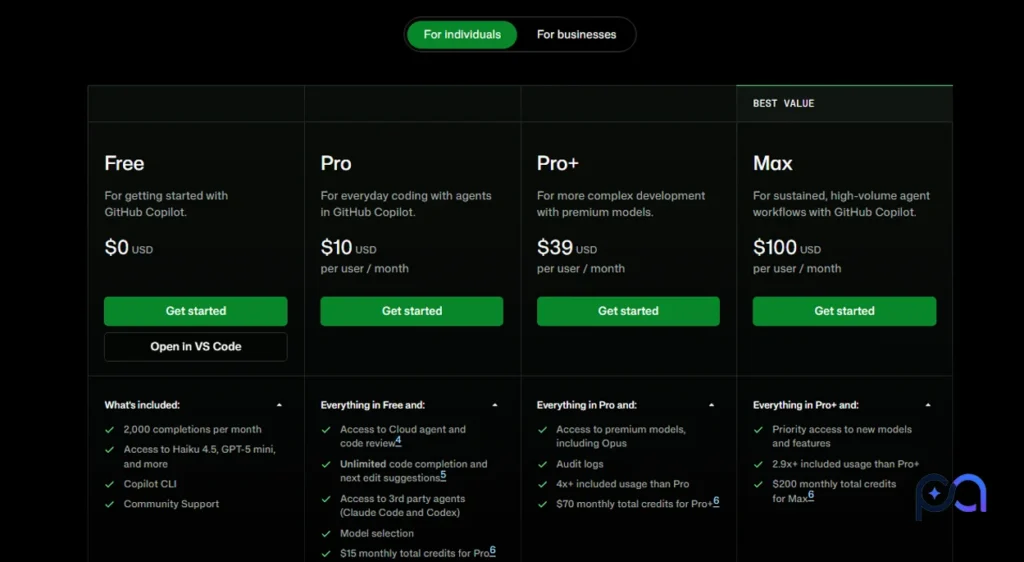
Prices last verified: October 4, 2026
GitHub moved new individual usage from premium-request billing to GitHub AI Credits on June 1, 2026. One AI Credit equals $0.01, and an interaction’s cost depends primarily on how many tokens are consumed and which model processes them. Paid code completions and next-edit suggestions remain unlimited and do not consume these credits.
| Plan | Price | Included AI Usage | Best For / Main Limitation |
|---|---|---|---|
| Free | $0 | Limited allowance; 2,000 completions/month | Trying Copilot; limited agent/chat usage |
| Pro | $10/month | 1,500 AI Credits total | Ordinary individual use |
| Pro+ | $39/month | 7,000 AI Credits total | More frequent agent and premium-model use |
| Max | $100/month | 20,000 AI Credits total | Sustained high-volume agent workflows |
| Business | $19/user/month | 1,900 pooled credits per user | Teams needing administration and governance |
| Enterprise | $39/user/month | 3,900 pooled credits per user | Larger organizations and enterprise controls |
For individuals, Pro’s 1,500 credits consist of 1,000 base credits plus a 500-credit flex allotment; Pro+ has 3,900 base plus 3,100 flex; Max has 10,000 plus 10,000. GitHub says the flex allotment can change over time, while base credits are tied to the subscription. Unused monthly credits do not roll over.
After exhausting the included allowance, paid individual users can set a budget for additional usage rather than immediately upgrading. Since one credit equals one cent, an additional $10 budget corresponds to 1,000 AI Credits. Auto model selection gives paid subscribers a 10% discount on the model cost it routes to.
Current GitHub documentation lists the mainstream plans on monthly billing. Existing Pro and Pro+ subscribers who remained on older annual subscriptions may still use the legacy premium-request billing system until that legacy arrangement ends.
Which GitHub Copilot Plan Makes Sense?
Use Free first if you are simply determining whether Copilot fits your workflow. Pro is the logical baseline for an individual developer who wants unlimited completion plus moderate chat and agent usage. Pro+ provides substantially more included AI usage for developers using agents more frequently, while Max targets sustained agent-heavy workflows.
A professional organization should evaluate Business or Enterprise instead of buying separate individual accounts because those plans add centralized policies, governance, pooled usage and organizational data protections.
Is GitHub Copilot Free?
Yes. Copilot Free currently includes 2,000 inline code completions per month, Copilot CLI, agent mode, and a limited allowance for AI-powered chat and agent interactions. However, Free and Student users use Auto model selection rather than manually selecting models, and Free does not include the paid cloud-agent experience.
One reason to be careful with older reviews is that some GitHub pages still contain references to older fixed chat-request limits. The current billing documentation has moved to AI Credits, so the safer description of the Free plan is a limited AI allowance rather than assuming an old request number still defines usage.
GitHub Copilot Models
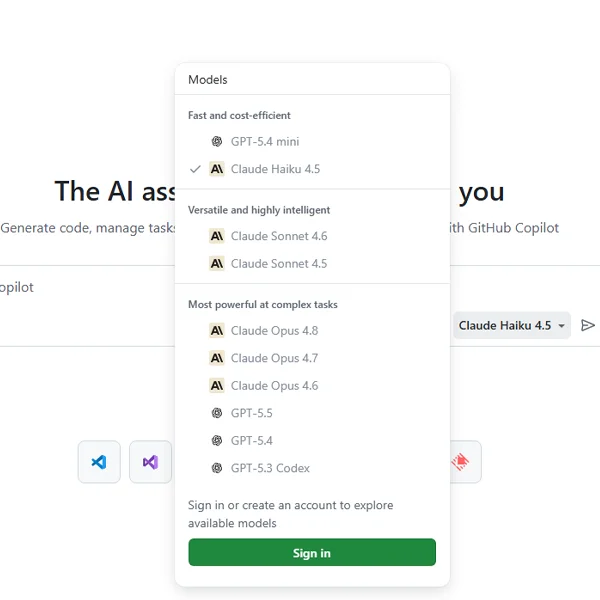
GitHub Copilot is the product; it did not create most of the models available inside it. Depending on your plan and client, Copilot can route requests to models from OpenAI, Anthropic, Google, Microsoft, xAI, Moonshot AI and others.
| Model / Family | Provider | Useful For |
|---|---|---|
| GPT-5.6 Luna | OpenAI | Fast, lower-cost everyday tasks |
| GPT-5.6 Terra | OpenAI | Balanced general coding and agent work |
| GPT-5.6 Sol | OpenAI | Complex debugging and large-codebase reasoning |
| GPT-6 Astra | OpenAI | Long-horizon autonomous development tasks |
| Claude Haiku 4.5 | Anthropic | Lightweight questions and quick edits |
| Claude Opus 5.5 | Anthropic | Long-running agentic work and error recovery |
| Gemini 3.8 Flash | Fast lightweight coding assistance | |
| MAI-Code-1.1-Flash | Microsoft | Fast coding, explanations and tool use |
| Kimi K3 | Moonshot AI | Long-context, multi-step agent work |
GitHub itself recommends choosing by task rather than assuming the largest model is always preferable. Lightweight models can be faster and cheaper for routine edits, while models such as GPT-5.6 Sol or GPT-6 Astra are intended for harder multi-step or long-running agentic work.
The catalog changes quickly. For example, GitHub’s retirement documentation shows that Claude Opus 4.7, Gemini 3.5 Flash, Gemini 3.6 Flash, and Kimi K2.7 Code were retired on October 2, 2026, making reviews that still present them as current choices already outdated.
Auto selection has also become more important. GitHub recently added Efficiency, Balance, and Intelligence preferences for Auto on supported clients; the selected tier affects how Copilot weighs cost, latency, and capability, while actual usage is still charged according to the model Auto selects.
Privacy and Source Code
GitHub Copilot is not a fully local coding assistant. Relevant prompts, code context, and other information needed to perform a request can be sent to GitHub’s hosted services or the applicable model infrastructure.
For individual Free, Pro, Pro+, and Max users, GitHub says it may use Copilot interactions—including prompts, outputs and code context—to improve AI models. Individual users can disable the setting that allows their data to be used for AI-model training. GitHub says Copilot Business and Enterprise customer data is not used for model training under its business data protections.
Current GitHub documentation does not organize this under a single feature called “Privacy Mode.” Instead, users and administrators get separate controls for model training, suggestions matching public code, model access and organizational policies.
Professional teams should also check which model provider will process a request because hosting and retention arrangements differ between model families.
GitHub Copilot Alternatives
| Tool | Best For | Main Difference From GitHub Copilot |
|---|---|---|
| GitHub Copilot | GitHub-centric development across multiple IDEs | Deep GitHub integration without forcing a new editor |
| Cursor | Developers wanting an AI-first editor | Dedicated AI coding editor; Pro currently starts at $20/month |
| Claude Code | Terminal-first agent workflows | Agentic coding centered around the terminal and repository |
| OpenAI Codex | Multi-agent CLI, IDE and cloud workflows | Coding agent connected across ChatGPT, IDE, CLI and cloud |
| Devin Desktop | IDE plus multi-agent command center | Windsurf has been rebranded as Devin Desktop |
| JetBrains Junie | JetBrains-focused developers | Native fit for JetBrains workflows with its own agent model |
Cursor is the clearest alternative for someone willing to make AI the center of the editor itself rather than add AI to an existing IDE. Its current individual Pro plan starts at $20 per month.
Claude Code is more terminal-oriented and can explore repositories, edit files, run tests and execute agentic workflows, while Codex spans its CLI, IDE extension, ChatGPT/desktop experience and cloud tasks. Meanwhile, the former Windsurf product is now branded Devin Desktop, with its IDE preserved alongside broader agent-management features.
What is GitHub Copilot?
GitHub Copilot is an AI coding assistant and agent that works in supported IDEs, GitHub, the terminal, and other development surfaces. It can autocomplete code, explain repositories, edit files, run development commands, review code, and perform multi-step development tasks.
Is GitHub Copilot free?
Yes. Copilot Free provides 2,000 completions per month plus limited AI-powered chat and agent usage. More extensive usage and features such as the cloud agent require a paid plan.
How much does GitHub Copilot cost?
Individual plans currently cost $10/month for Pro, $39/month for Pro+, and $100/month for Max. Business costs $19 per user per month and Enterprise $39 per user per month.
Is GitHub Copilot based on VS Code?
No. Copilot is not a VS Code fork. It integrates with VS Code as well as Visual Studio, JetBrains IDEs, Eclipse, Xcode and other environments.
Can GitHub Copilot build an app?
It can generate and modify enough files to build substantial parts of an application, particularly in agent mode. That does not mean an unsupervised generated application should automatically be considered production-ready; its architecture, tests, security and generated dependencies still need human review.
Can GitHub Copilot edit multiple files?
Yes. Copilot Edits and agent mode can both make multi-file changes. Edit mode gives you tighter control over the working set, while agent mode can select files and actions itself.
Is GitHub Copilot suitable for beginners?
Yes for learning, explanations and small projects, but a beginner may be less able to recognize incorrect or insecure generated code. It is more useful when treated as assistance rather than a replacement for understanding what the code does.
Is GitHub Copilot safe for private code?
It has controls intended for professional and organizational use, but it is not a purely local system. Businesses should review GitHub’s data policies and the hosting policy for the models they enable before sending sensitive proprietary code.
Is GitHub Copilot Worth Using?
GitHub Copilot makes the most sense for developers who already work in GitHub and want AI integrated directly into their existing editor rather than migrating to a separate AI-first IDE. Its combination of autocomplete, repository-aware chat, multi-file edits, terminal tools, code review, IDE agents, and asynchronous cloud agents covers considerably more than traditional code completion.
The main question in 2026 is no longer simply whether Copilot can generate useful code. It is how much agent usage your workflow consumes. The switch to token-based GitHub AI Credits makes light autocomplete users and heavy autonomous-agent users very different customers. A $10 Pro subscription may be perfectly adequate for one developer, while long-running multi-file agent sessions with higher-cost models can consume the allowance much faster for another.
For someone testing AI-assisted coding, Copilot Free is enough to understand the workflow. Pro is the practical entry point for regular individual development. Developers who run agents extensively should compare Pro+, Max, and alternatives based on actual monthly usage rather than assuming the lowest advertised subscription price represents their final cost.
Similar AI Tools

OpenAI Codex Features, Installation, Pros, Cons, and Best Alternatives

OpenCode Review Features, Pricing, Setup & Models

Claude AI – Coding, Content Creation & Data Analysis Compared.
