

Adobe Firefly Review Free AI Text to Image Generator, Video Tools, and Everything You Need to Know
Adobe Firefly is Adobe’s family of generative AI models built specifically for creative professionals who need more than just a text-to-image tool. Unlike most standalone AI generators, Firefly works directly inside the apps you already use, Photoshop, Premiere Pro, Illustrator, and Adobe Express, turning everyday creative tasks into prompt-driven workflows. In under two years, Firefly has been used to generate over 18 billion assets globally, growing from a simple free AI text to image generator into a full creative suite that now includes a free AI video generator, audio tools, and real-time collaborative boards. This review covers everything you need to know: what it does, how it works, how much it costs, and whether it actually delivers.
What Is Adobe Firefly
Adobe Firefly is not a single tool. It is a family of AI models built and maintained by Adobe, designed to generate images, videos, audio, and vector graphics from text prompts. What makes it different from most other AI generators is where it lives. You can work directly from the Adobe Firefly app or find its features within other Adobe products like Adobe Express, Illustrator, InDesign, Lightroom, Photoshop, and Premiere Pro.
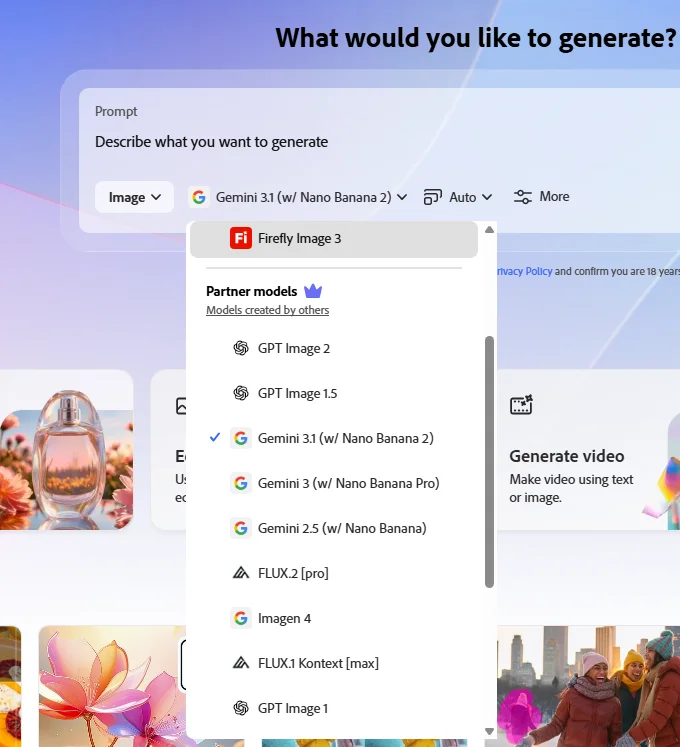
The platform launched in 2023 and has expanded rapidly. The December 2025 update was the most significant since launch, adding Runway’s Gen-4.5 video generation, Black Forest Labs’ FLUX.2 for images, and a full video editor in beta, meaning you can generate videos, edit them with text prompts, and upscale to 4K without leaving your browser.
Firefly targets a specific audience: creative teams, marketing departments, designers, and content producers who need commercially usable assets fast. It is less suited to artists chasing a particular aesthetic and more suited to professionals who need reliable, legal, brand-safe output at scale.
How Adobe Firefly Works
At the core level, Firefly works like most AI image generators. You type a text prompt describing what you want, choose your settings, and the system generates images or video based on that input. But several elements underneath the surface separate it from competitors.
The generative credit system
Instead of unlimited generations, Firefly runs on a credit system. Most standard generative features use 1 credit per generation, while premium generative AI features such as video creation consume more credits per use, with the exact amount depending on the model selection, output, and file size.
Every plan comes with a monthly credit allocation that resets on your billing date. Credits don’t roll over between months on consumer plans, so any unused credits at the end of a billing period are lost.
How image generation works
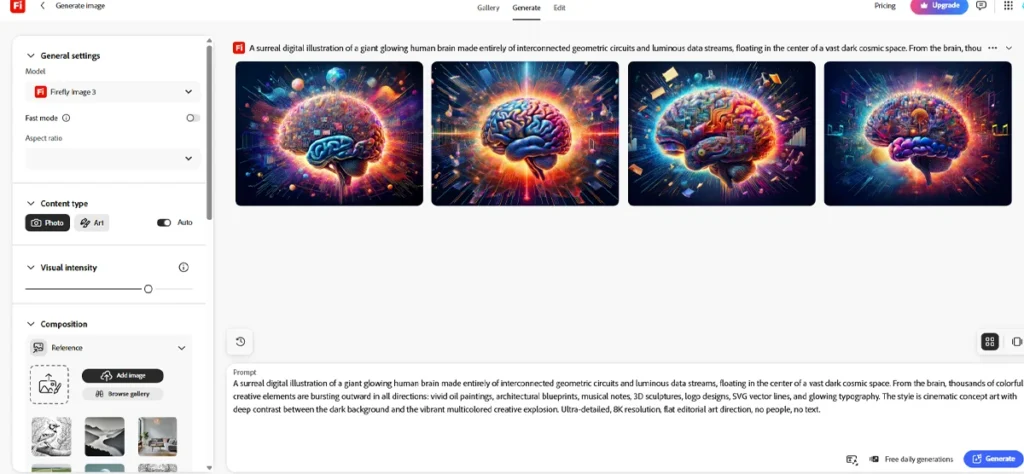
You write a text prompt, select your aspect ratio, choose a visual style or content type, and hit generate. Firefly returns four image options. You can then adjust, refine, or take the result into Photoshop or Adobe Express for further editing. Firefly Image Model 5, which launched at MAX 2025, brought improvements in photorealism and introduced prompt-based editing, meaning you can describe edits in everyday language rather than technical prompts.
How video generation works
You log into Firefly and navigate to the Generate tab, choose Generate Video or explore additional video features, and from the dropdown menu, choose the Firefly video model or a partner model such as Google Veo, Sora, or Pika. You then write a prompt describing the clip, including details like style, angle, effects, and subjects, or upload an image and add a prompt to animate it. With the video editor released in December 2025, you can also use text prompts to edit video elements, colors, and camera angles, and a new timeline view lets you adjust frames, sounds, and other characteristics.
Core Features of Adobe Firefly
Firefly covers a wide range of generation and editing tasks. Here is what each feature actually does.
Free AI Text to Image Generator
The flagship feature. You type a description, select a style, aspect ratio, and content type, and Firefly generates four image options. Its Image Model 4 and 5 create lifelike visuals with precise details, such as realistic human faces or detailed landscapes. Text rendering inside images has also improved significantly, though it still occasionally struggles with longer words or complex typography.
Key controls available inside the text-to-image tool:
- Aspect ratio (square, landscape, portrait, widescreen)
- Visual intensity slider
- Content type (photo, graphic, art)
- Style presets (cinematic, watercolor, anime, etc.)
- Color and tone adjustments
- Lighting controls
- Reference image upload to match a specific style
Free AI Video Generator
Firefly’s video generator supports Text to Video, where you generate clips from prompts, and Image to Video, where you add motion, camera movement, or environmental animation to a still image.
It can also create AI generated videos with expressive, high-resolution close-ups of human faces and features for character design, prototyping, or narrative content, or generate lifelike avatars with Text to Avatar.
Output quality reaches 1080p. Style presets include claymation, anime, and 2D animation, making it useful for creators who need varied visual formats without switching platforms.
One honest limitation worth flagging: video generations cost significantly more credits than image generations. A single 5-second clip can consume a meaningful portion of your monthly allocation on lower-tier plans.
Generative Fill in Photoshop
This is arguably Firefly’s most practical feature for professional designers. You select any area in Photoshop, type what you want there, and Firefly fills it contextually. Generative Fill works for removing objects, extending backgrounds, and adding elements, and it works about 70% of the time without refinement. The remaining cases usually need a second prompt or slight selection adjustment.
Generative Extend in Premiere Pro
Generative Extend will lengthen any input video by up to two seconds, making it useful for editors who need to pad a clip slightly to improve timing or transitions without reshooting.
Text Effects
Type a word or phrase and Firefly applies an AI-generated visual treatment to the letters themselves. Useful for titles, logos, and social media graphics. Results are usable but not always precise; complex effects occasionally break the readability of the text.
Firefly Boards
A collaborative ideation space that lets creative teams brainstorm, generate, and organize assets together inside a shared canvas. Think of it as a mood board that can generate assets on demand. Useful for agency teams or in-house creative departments that need to align on direction before production begins.
Prompt to Edit
A conversational editing interface that empowers creators to describe the edits they want to make to an image in everyday language, similar to how they prompt text-to-image tools to create new images. Instead of selecting masks and adjustment layers, you describe the change: “make the background warmer” or “add fog to the lower half of the image.”
Scene to Image (3D)
Using a lightweight 3D sketching tool, creative professionals can transform artwork into beautiful high-resolution images, build structure references directly within Text to Image, and create precise visual guides using intuitive 3D tools. This is still in beta but shows strong potential for product visualization and architectural concept work.
Partner Model Access
One subscription now gives you access to models beyond Firefly’s own. Available partner models include Black Forest Labs’ FLUX.2, which generates and edits images with photorealistic detail, offers advanced text rendering, and can support up to four reference images. Other available models include Google Veo, Runway Gen-4.5, Sora, and Pika for video generation.
This matters because it means you are not locked into Firefly’s output quality. If Firefly’s image model does not suit a specific task, you can switch to FLUX.2 or another partner without leaving the platform.
Adobe Firefly Pricing Plans
| Tier 1 Free $0 / mo | Tier 2 Standard $9.99 / mo | Most popular Pro $19.99 / mo | Tier 4 Premium $199.99 / mo | |
|---|---|---|---|---|
| Credits & Generations | ||||
| Monthly premium credits | Limited | 2,000 | 4,000 | 50,000 |
| Unlimited standard generations | — | ✓ | ✓ | ✓ |
| Approx. 5-sec videos / month | 2 | ~20 | ~40 | ~500 |
| Audio / video translation | 40 sec | ~6 min | ~13 min | ~166 min |
| Features | ||||
| Text-to-image & Generative Fill | ✓ | ✓ | ✓ | ✓ |
| Video generation (text & image-to-video) | — | ✓ | ✓ | ✓ |
| Partner AI models (Google, OpenAI, Flux…) | — | — | ✓ | ✓ |
| Adobe Express Premium | — | — | ✓ | ✓ |
| Photoshop (web & mobile) | — | — | ✓ | ✓ |
| Queued video generation after credits | — | — | — | ✓ |
Adobe Firefly Use Cases
Firefly is a broad platform, but it performs better in some contexts than others. Here are the real-world scenarios where it earns its place, and a few where it falls short.
Marketing and Advertising Teams
This is where Firefly is most at home. Firefly accelerates content production, enables rapid versioning and localization, and helps organizations deliver personalized experiences while maintaining brand integrity and governance. A marketing team producing campaign assets across multiple regions can use Firefly to generate image variants, resize formats, and adapt visuals without going back to a designer for every iteration.
Social Media Content Creation
For social media managers who need a consistent stream of original visuals, Firefly’s text-to-image tool handles the volume reasonably well. Style presets speed up the process, and the aspect ratio controls make it straightforward to generate content sized for different platforms from a single prompt.
Video B-Roll and Explainer Content
Whether you need cinematic nature scenes or B-roll landscapes, clips to complement your stock footage library, or supporting visuals for interviews or explainers, the Firefly video generator makes it easy to get high-quality results. For video editors working on documentary-style content, product explainers, or YouTube productions, Firefly-generated B-roll can fill gaps in a timeline without stock library licensing costs.
Photoshop-Based Photo Editing Workflows
For retouchers and photo editors, Generative Fill inside Photoshop is the single most useful entry point into Firefly. Removing distracting elements, extending a background to fit a new aspect ratio, or adding a missing object to a scene all work well within established editing workflows. This is the use case with the smoothest integration because it fits into a process the user already has rather than requiring a new one.
Branding and Custom Model Training
Organizations can train Custom Models on proprietary brand assets, enforce design and governance rules, validate outputs against brand guidelines, and apply Content Credentials for transparency. For enterprises with established visual identities, this means generating on-brand assets at scale without a designer approving every image. Custom Models make Firefly genuinely useful at the enterprise level, though this feature sits behind higher-tier plans.
Concept Art and Pre-Production
The Scene to Image (3D) feature and reference image uploads make Firefly usable for early-stage concept work. Directors, game designers, and art directors can sketch rough compositions and use Firefly to produce polished reference images for team reviews. The output quality is not always consistent enough for final assets, but it works well as a starting point.
Commercial Safety and Why It Matters
Commercial safety is the single biggest differentiator Firefly has over most competitors, and it is worth understanding clearly rather than just accepting the marketing language around it.
What “commercially safe” actually means
One reason people choose Adobe Firefly over other generative AI tools is its training data, which includes Adobe Stock images, openly licensed images, and public domain images with expired copyrights. This training helps prevent legal problems related to content creation and ensures safe commercial use of Adobe Firefly images.
Adobe does not train on any Creative Cloud subscribers’ personal content. For Adobe Stock contributors, the content is part of Firefly’s training dataset, in accordance with Stock Contributor license agreements.
This is a meaningful distinction. Tools like Midjourney and Stable Diffusion have faced lawsuits and ongoing legal debate about the datasets used to train their models. Firefly sidesteps this entirely by using only licensed or public domain material.
Content Credentials
Adobe automatically attaches Content Credentials to images created in Firefly to show that they were AI generated. This level of transparency gives creators a way to authenticate their content and helps consumers make informed decisions about content they see online. Think of Content Credentials as a digital label that travels with the file, showing what was AI-generated and when.
IP Indemnification for Enterprise Users
Starting in 2023, Adobe announced that enterprise customers of Firefly get full indemnification for the content created using the tool. If someone ever sues your company claiming a Firefly-generated image infringes their copyright, Adobe will cover the legal bills and damages.
This is not a trivial offer. For agencies and brands producing commercial content at scale, the legal liability question around AI-generated images is a real business concern. Firefly is currently the only major AI image platform with this level of formal legal protection.
Where the limits are
Commercial safety does not mean anything goes. As with the use of all Creative Cloud products and services, Firefly outputs cannot be used in an illegal manner or in connection with creating, training, or otherwise improving AI and machine learning models. You cannot use Firefly outputs to train competing AI systems, and content restrictions around violence, nudity, and other categories still apply.
Adobe Firefly vs Competitors
Here is a direct comparison across the tools most people consider alongside Firefly.
| Feature | Adobe Firefly | Midjourney | DALL-E 3 | Stable Diffusion |
|---|---|---|---|---|
| Artistic quality | Good; photorealism improved in 2025 | Excellent; leads on creative visuals | Very good; strong prompt accuracy | Variable; depends on model and setup |
| Commercial safety | Strongest in class; licensed training data + indemnification | No formal indemnification; training data disputed | Reasonable; OpenAI policies apply | Open source; user responsible |
| Editing integration | Deep; lives inside Photoshop, Premiere Pro, Express | Minimal; primarily a generation tool | Limited to ChatGPT/API context | Requires separate tools or extensions |
| Video generation | Yes; Text to Video, Image to Video, partner models | No | No (as of mid-2025) | Via separate models (e.g. AnimateDiff) |
| Free plan | Yes; limited credits | No; paid only | Yes; via ChatGPT free tier | Yes; self-hosted is free |
| Ease of use | High; clean web interface | Moderate; Discord-based | High | Low to moderate; technical setup required |
| Pricing entry point | Free to $9.99/month | $10/month minimum | Included with ChatGPT Plus ($20/month) | Free (self-hosted) |
Where Firefly wins
Firefly scores highest for editing capabilities and commercial safety. That combination is why it is the sensible choice for organizations that care about approval chains, client work, branded assets, and licensing clarity.
For existing Adobe Creative Cloud subscribers, the value proposition is clear. You are not paying extra for a separate AI tool. Firefly’s features are already inside the applications you use every day.
Where Firefly falls behind
For pure artistic quality, Midjourney wins. Midjourney consistently produces more visually striking, detailed, and aesthetically sophisticated images. If you are creating concept art, editorial illustrations, or any content where artistic impact is paramount, Midjourney delivers results that Firefly cannot match.
Compared with DALL-E, Firefly is a little behind on prompt fidelity and realism but ahead on editing. Compared with Stable Diffusion, it gives up deep customization in exchange for better commercial safety and ease of use.
Human face generation is an area where Firefly still shows inconsistency. In testing across 20 portrait prompts, roughly 30% required at least one regeneration to produce a result usable without further retouching. Midjourney produced tighter face detail in initial outputs across the same prompt set.
Many professional workflows combine both tools: Midjourney for initial concept exploration and creative ideation, then Firefly for production refinement and commercial execution. That split approach is worth considering for studios or agencies that do both kinds of work.
Pros and Cons of Adobe Firefly
Pros
- Strongest commercial safety of any major AI image tool, with enterprise-level IP indemnification
- Deep integration with Photoshop, Premiere Pro, Illustrator, and Adobe Express
- Free AI text to image generator accessible without a paid plan
- Free AI video generator included in the platform (credits required)
- Access to partner models including FLUX.2, Runway Gen-4.5, Google Veo, and Sora in one subscription
- Content Credentials provide transparent provenance for every generated asset
- Custom Models allow brand-specific training for enterprise teams
- Supports over 100 languages for text prompt inputs
- Firefly Boards enable real-time collaborative ideation
- Prompt to Edit reduces the technical skill needed for image adjustments
Cons
- Free plan credits are limited; video generation burns through them quickly
- Credits do not roll over month to month, so unused allowances are lost
- Artistic expressiveness trails Midjourney for creative and editorial work
- Human face generation still produces inconsistent results without follow-up refinement
- Quality and variation in generation need improvement, according to user feedback from working designers
- Firefly performs best when given straightforward instructions and does not offer the same level of prompt flexibility or conversational nuance as DALL-E 3 or Midjourney
- Some of the most useful features, like Custom Models and IP indemnification, are locked behind enterprise plans
- The credit system can feel confusing; knowing in advance how many credits a task will consume takes time to learn
Who Should Use Adobe Firefly
Firefly is a strong fit if you:
- Already subscribe to Adobe Creative Cloud and want AI capabilities without adding another tool or subscription
- Work in marketing, advertising, or content production and need legally safe images and video at volume
- Regularly edit images in Photoshop and want Generative Fill to speed up retouching and compositing tasks
- Manage brand assets for a business and need consistent, on-brand outputs across a team
- Produce video content and need B-roll, short clips, or animated stills without a full video production budget
- Work in a regulated industry where copyright liability is a genuine concern
Firefly is not the right tool if you:
- Primarily need high-impact creative visuals where artistic quality matters more than legal compliance (Midjourney is more appropriate here)
- Want to generate images in very high volume on a tight budget, since credit costs accumulate fast and do not roll over
- Need deep prompt flexibility or model customization at the technical level (Stable Diffusion gives more control for users willing to manage the setup)
- Are an individual creator or hobbyist who does not use any Adobe products, as the value of Firefly scales significantly with the rest of the Creative Cloud ecosystem
Final Verdict
Adobe Firefly in 2025 is the most complete AI creative platform for professional workflows, but it is not the most creatively ambitious. It excels at a specific job: producing commercial-grade, legally sound visual content at scale, inside tools professionals already use every day.
The commercial safety argument is real and meaningful. Per Adobe Firefly’s content credentials and commercially safe AI frameworks, Firefly users have full legal rights to their generated outputs, making work safe for personal and professional use. No other major platform offers the same combination of licensed training data, Content Credentials, and enterprise IP indemnification.
The limitations are equally real. If you want striking concept art, a moody editorial image, or an output that surprises you with something unexpected, Midjourney still produces better results. Firefly’s image output is capable and improving, but it prioritizes reliability over artistry.
The free AI text to image generator and the free AI video generator make Firefly worth trying for any creator, even those not yet inside the Adobe ecosystem. The free tier has enough capacity to evaluate whether the tool fits your workflow before committing to a paid plan.
For Creative Cloud subscribers, the calculation is simple: Firefly is already included, and it is worth activating. For everyone else, the decision comes down to whether commercial safety, workflow integration, and a growing set of partner models outweigh the higher pricing compared to standalone alternatives.
Firefly is the right tool for teams that need to move fast, stay legal, and work inside a professional production pipeline. It is not the right tool for those chasing the frontier of AI creativity for its own sake.
Similar AI Tools

Recraft AI Review The Free SVG Converter , logo generator and Image Generator

Runway Gen-3 Alpha Review 2026 What It Actually Delivers and Where It Costs You

Kling AI Review 2026 – What It Actually Delivers for Video Creators
