

Pika Ai Review What It Does Well and Where It Falls Short
Pika Ai launched in February 2025 with a feature set built around one clear proposition faster, more controlled short-form video for social creators. Pikaframes gave users something previous versions lacked, a way to define where a clip begins and ends. The effects suite expanded. Resolution improved.
The tool earned genuine enthusiasm from its target audience. It also earned some of the harshest user reviews in the AI video space, with billing complaints and output failures appearing consistently across Trustpilot and Reddit throughout 2025 and into 2026.
Both things are true at once, and understanding why requires knowing exactly what job Pika 2.2 is built for. This review covers what the tool does well, where it fails, what it costs in practice, and how it compares to the three alternatives a real buyer would consider before subscribing.
What Pika Ai Actually Is
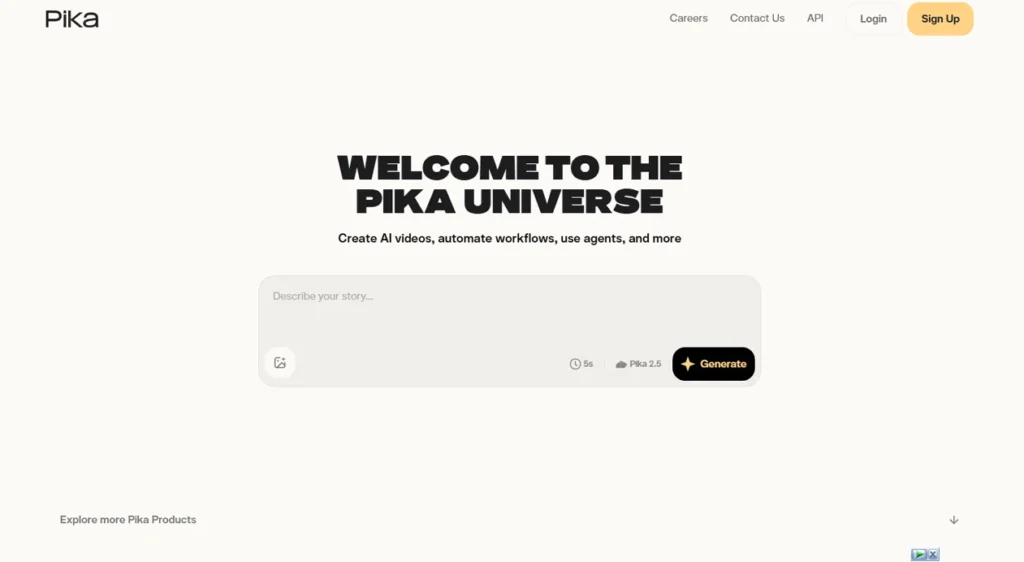
Pika Ai is an AI video generator built by Pika Labs and accessible at pika.art. The tool takes a text prompt, a static image, or an existing video clip and generates a short video output using machine learning models trained on large visual datasets.
The platform is not a video editor. There is no timeline, no layer system, no audio mixing. What Pika offers instead is rapid generation with creative effects layered on top. Type a prompt, adjust a few settings, and receive a clip in one to two minutes.
The intended audience is social content creators, digital marketers running quick visual tests, and artists exploring generative animation. Pika Labs has said as much through its positioning. The platform’s 500,000-user community generates millions of videos weekly, and the majority of that output targets TikTok, Instagram Reels, and YouTube Shorts. Anyone expecting broadcast-quality footage or precise narrative control is looking at the wrong tool.
What You Get With Pika 2.2
The 2.2 release introduced three meaningful upgrades over its predecessor and carried forward a growing effects suite. Here is what the tool actually includes.
Pikaframes and Keyframe Control
Pikaframes is the headline feature of this release. The workflow is straightforward. Upload a starting image, upload an ending image, set a duration between one and ten seconds, and Pika generates the transition between them. The result is a clip that moves from a defined visual state to another defined visual state with AI-generated motion filling the gap.
This matters because earlier Pika versions gave creators almost no control over where a clip ended up visually. A prompt might gesture toward the right idea, but execution varied widely. Pikaframes changes that dynamic by anchoring both ends of the clip to real reference images. The transition itself still carries some unpredictability, but the start and end points hold.
The limitation worth noting here is that Pikaframes works best with compositions that share similar framing and subject placement. Large differences between the two images often produce morphing artifacts rather than smooth interpolation.
Effects Suite
Pika Ai carries four main effects tools that separate it from more straightforward text-to-video generators.
Pikaffects applies physics-style transformations to subjects or scenes. Options include melt, explode, inflate, squish, and similar one-click effects. These are fast, repeatable, and purpose-built for social media hooks.
Pikadditions lets users insert a character or object from a reference photo into a generated or uploaded video. Upload a photo of a product, a person, or a character, describe the scene, and Pika blends the subject into the generated footage.
Pikaswaps replaces an object or character within an existing clip. Point to the element to replace, provide a reference or prompt, and Pika substitutes it. The results are imperfect at fine details but serviceable for stylized content.
Pikaformance drives lip-sync from an audio input. Feed it a voice line and a character image, and the character speaks with matched mouth movement.
Resolution, Duration, and Camera Control
| Feature | Pika Ai Spec |
|---|---|
| Maximum clip duration | 10 seconds |
| Resolution options | 720p or 1080p |
| Camera motion | Prompt-embedded (pan, zoom, orbit, track) |
| Generation modes | Text-to-video, image-to-video, video-to-video |
| Aspect ratios | Landscape, portrait, square |
| Audio generation | No native audio output |
Camera direction in Pika Ai is embedded directly in the text prompt. Writing “slow push in toward the subject” or “orbital movement from left” produces recognizable camera behavior in most cases. It is not as reliable as a dedicated camera control panel, but it works often enough to be useful for short social clips.
The absence of native audio output is a real gap in 2025 and 2026. Kling 2.6 and Runway Gen-4.5 both generate or support audio alongside video. Pika clips arrive silent and require a separate step to add sound.
User Experiences What Creators Are Actually Saying
Feedback on Pika 2.2 splits cleanly along the line of use case. Creators who came in expecting a social clip tool generally reported positive experiences. Those who expected production-grade output reported significant frustration.
On the positive side, speed was the feature that surprised users most consistently. A 60-generation test run by FluxNote across a full Pro plan month found that most clips returned in one to two minutes, with Pikaformance lip-sync results landing in under ten seconds in many cases.
Reviewers on Product Hunt described Pika as replacing Runway Gen-2 in their workflow entirely, with particular praise for face preservation in image-to-video generations and the camera control options embedded in prompt text.
The outcome that multiple users described getting from the tool was short social hooks that needed minimal editing before posting. The Pikaffects suite, particularly the one-click melt and explode effects, was called out repeatedly as producing content that performs well in feed environments without any post-processing.
The disappointment that appeared most consistently, and most loudly, was output quality in anything beyond simple stylized clips. Curious Refuge ran structured testing on Pika ai 2.2 and scored it 1.9 out of 10 for prompt adherence and 1.4 out of 10 for temporal stability.
Trustpilot reviewers described results as failing to follow prompts, with one reviewer directly comparing the quality to the widely-circulated Will Smith spaghetti video that became a benchmark for early-generation AI video failure. Multiple users on Trustpilot recommended switching to Runway after their trial period.
Billing and support complaints ran parallel to the quality feedback and in many cases overshadowed it. Users reported credits being deducted on failed generations, watermarks persisting after paying for a watermark-free tier, and subscription cancellation flows that required switching to a Basic plan rather than clicking a visible cancel button. Customer support response times on Trustpilot were described consistently as nonexistent, with automated replies and no follow-up being the standard experience.
Pricing Pika Ai What You Pay and What You Actually Get
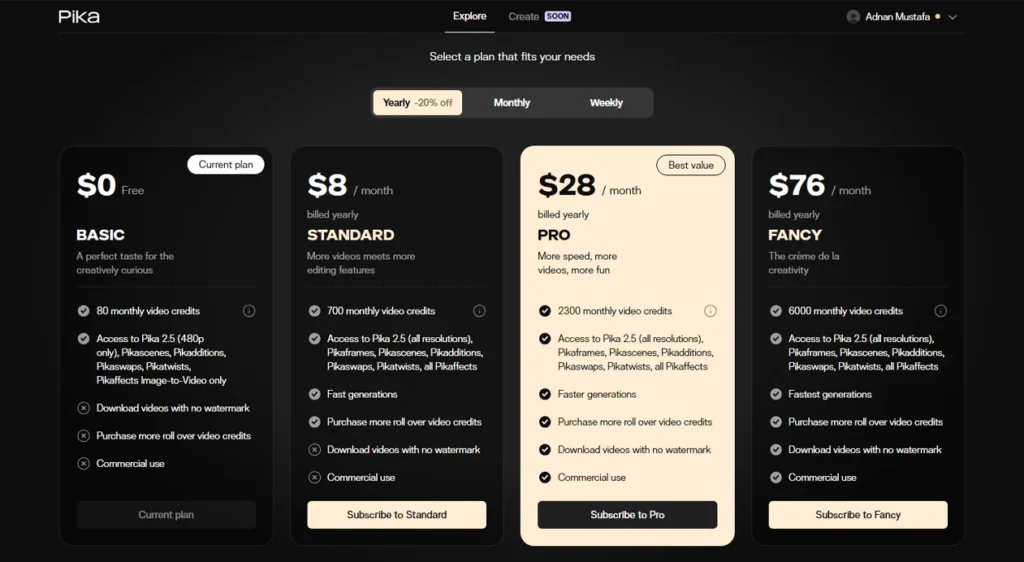
Pika Ai runs on a credit-based system where every generation costs a fixed number of credits depending on resolution, duration, and which feature is used. A standard 1080p text-to-video clip at five seconds costs around 40 credits. A ten-second Pikaframes interpolation at 1080p costs significantly more.
| Plan | Monthly Price (Annual) | Credits Per Month | Watermark-Free | Commercial Rights |
|---|---|---|---|---|
| Free | $0 | 80 | No | No |
| Standard | $8 | 700 | Yes | No |
| Pro | $28 | 2,000 | Yes | Yes |
| Fancy | $76 | 6,000 | Yes | Yes |
Two restrictions define the practical experience more than the credit totals do. First, credits do not roll over at the end of the billing cycle. A month of lighter use does not carry forward. Second, commercial rights require Pro or above, which means the Standard plan at $8 per month produces watermark-free output that cannot be used in client work or paid promotions without upgrading.
Credits are also deducted on failed generations. That policy, confirmed across multiple Trustpilot accounts and Reddit threads, means a generation that returns unusable output still costs the same as a successful one.
Pika Ai vs the Alternatives
The three tools that appear alongside Pika in real creator comparisons are Runway Gen-4.5, Kling AI, and Luma Dream Machine. Each occupies a different position in the market.
| Pika Ai | Runway Gen-4.5 | Kling AI (3.0) | Luma Dream Machine | |
|---|---|---|---|---|
| Max clip duration | 10 seconds | 10 seconds | Several minutes | ~5 seconds |
| Resolution | Up to 1080p | Up to 720p (verify export) | Up to 4K | Up to 1080p |
| Native audio | No | Yes | Yes (2.6+) | No |
| Starting price | $0 (free tier) | $12/month | $8/month | $0 (free tier) |
| Best use case | Social effects clips | Professional narrative | Long clips, character motion | Cinematic image-to-video |
| Output consistency | Inconsistent | High | High | Moderate |
Runway Gen-4.5 sits above Pika on raw output quality and consistency. Its References system allows creators to lock in specific characters, styles, and scenes across multiple generations. For client work or anything requiring visual continuity across shots, Runway is the more defensible choice. The trade-off is price and speed. Runway generations take longer and cost more per clip than comparable Pika output.
Kling AI outperforms Pika on natural motion handling and clip duration. Community comparisons consistently place Kling above Pika for complex human movement, photoreal scenes, and longer narrative sequences. Kling 2.6 added native audio generation, which widens the gap further for creators who need video and sound in a single output.
Luma Dream Machine serves a different aesthetic. It favors smooth, cinematic image-to-video transitions with a dreamlike quality that suits music videos and abstract content. Where Pika leads with bold stylized effects, Luma leans toward atmospheric motion. For social content where the visual mood matters more than a specific effect, Luma is a legitimate alternative at a similar price point.
The honest conclusion from community comparisons is that Pika wins on speed, affordability, and the specific creative effects in its suite. For any job where output consistency or clip duration matters, Runway or Kling is the stronger pick.
Pika Ai Features
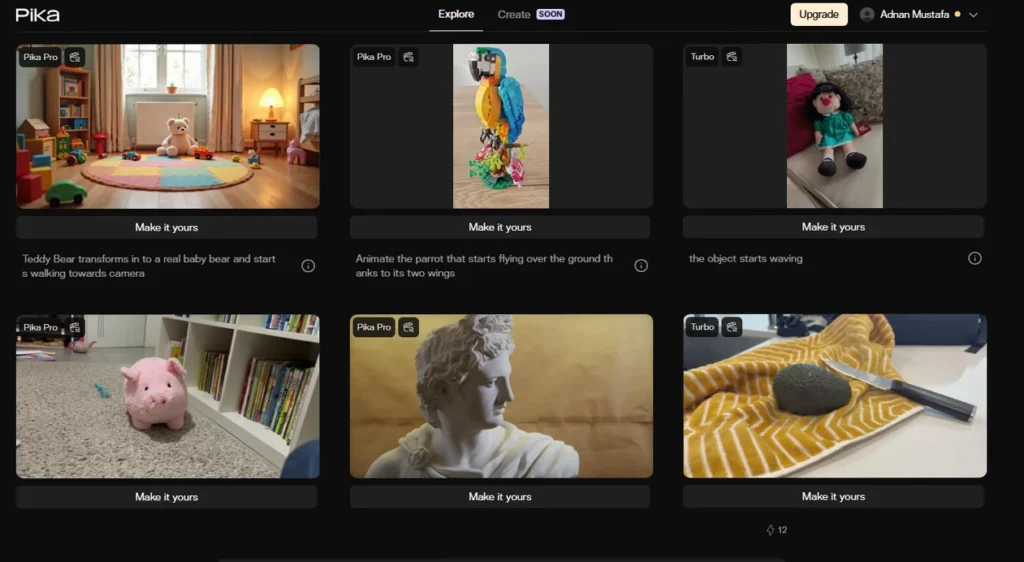
- Generation speed is genuinely fast Most clips return in one to two minutes. Lip-sync results through Pikaformance often land in under ten seconds. For creators iterating through five or ten prompt variations on a single idea, this speed advantage compounds quickly across a session. (Source: FluxNote 60-generation test, June 2026)
- The effects suite has no direct equivalent at this price point Pikaffects, Pikadditions, and Pikaswaps combine into a creative manipulation toolkit that Runway and Kling do not replicate for casual users. The one-click physics effects in particular are built specifically for social feed performance. (Source: Product Hunt reviews, community tier lists)
- Pikaframes gives beginners meaningful creative control The ability to anchor the start and end of a clip to real images reduces the randomness that frustrates new users on most text-to-video tools. (Source: Product Hunt, Pika 2.2 launch thread)
- The free tier is a genuine trial Eighty credits per month covers two to three test generations at 480p, which is enough to evaluate the tool before committing. Runway’s free tier is more restrictive by comparison.
Disadvantages of the Pika Ai tool
- Output quality breaks down outside simple stylized prompts. Curious Refuge scored Pika 2.2 at 1.9 out of 10 for prompt adherence in structured testing. Complex scenes, specific character interactions, and precise action sequences regularly produce results that do not follow the prompt. Users on Trustpilot described unusable output as a consistent pattern, not an occasional failure.
- Credits do not roll over and failed generations still cost credits. Both policies were confirmed across multiple Reddit threads and Trustpilot accounts. For anyone whose usage varies month to month, the non-rollover policy means paying for credits that expire unused.
- Customer support is effectively non-functional for billing issues. Trustpilot accounts describe automated replies, ignored follow-ups, and subscription cancellation flows designed around confusion rather than clarity. Several users reported resorting to credit card chargebacks as the only resolution path.
- No native audio output. Pika clips arrive silent. In a market where Kling 2.6 and Runway Gen-4.5 both support audio generation, this is a meaningful production gap for anyone building content that needs sound.
What Makes Pika Different
The effects suite is the honest differentiator. Pikaffects, Pikadditions, and Pikaswaps do not have direct equivalents in Runway or Kling at a comparable price and accessibility level. These are not premium features buried behind an enterprise plan. They are core to the Pika experience and available starting at the Standard tier.
The second differentiator is positioning. Pika made a deliberate choice to serve the social content cycle rather than professional production. That choice produced a tool that is faster, cheaper, and more playful than its competitors, at the cost of the consistency and duration those competitors prioritize. For a creator posting three times a week to Reels and TikTok, that trade-off is often worth it. For a production team delivering client work, it is not.
My opinion on Pika Ai
After going through the research and the recurring feedback above, my take is that Pika Ai earns its place for a specific type of creator and fails a different one entirely.
If your output lives on TikTok, Instagram Reels, or YouTube Shorts, and your metric for success is engagement on a fast-turnaround clip, Pika Ai is a legitimate tool at a price that makes experimentation low-risk. The effects suite genuinely has no equivalent at this price point, and the generation speed makes iterating through ideas fast enough to stay inside a social posting rhythm.
The case against it is just as clear. Output consistency is poor by the standards of any structured quality test. The billing system carries real risk for professional users, with non-rollover credits, charges on failed generations, and a support operation that does not reliably resolve disputes. Anyone doing client work, building a production pipeline, or needing audio alongside video should route that budget toward Runway Gen-4.5 or Kling instead.
Pika 2.2 is a capable creative sandbox. Just be clear-eyed about what a sandbox is built for before subscribing to the Pro plan.
Is Pika AI free to use?
Pika 2.2 has a free tier that gives new users 80 credits per month. That covers two to three generations at 480p resolution. Free-tier output carries a watermark and cannot be used for commercial purposes. The free plan is enough to evaluate the tool before committing to a paid subscription, but it is not enough to support a consistent content workflow. Standard starts at $8 per month for roughly 700 credits without a watermark.
How does Pika 2.2 compare to Runway Gen-4.5?
Runway Gen-4.5 produces more consistent output and supports native audio alongside video. Its References system allows character and style locking across multiple generations, which Pika does not offer. Pika wins on speed, price, and the creative effects suite. For social content where fast turnaround matters more than precision, Pika is the more practical choice. For client work or narrative video that requires visual continuity, Runway is the stronger option.
What is Pikaframes and how does it work?
Pikaframes is a keyframe interpolation feature introduced in Pika Ai. Users upload a starting image and an ending image, set a clip duration between one and ten seconds, and Pika generates the visual transition between them using AI. The feature gives creators direct control over the beginning and end of a clip, reducing the unpredictability that affects standard text-to-video generation. Results are most reliable when the two reference images share similar subject placement and framing.
Does Pika 2.2 support commercial use?
Commercial rights are available on the Pro plan ($28 per month, billed annually) and the Fancy plan ($76 per month, billed annually). The Free and Standard tiers do not include commercial rights. Output from those tiers cannot be used in paid advertising, client deliverables, or monetized content without upgrading.
What are the main weaknesses of Pika 2.2?
Three weaknesses appear consistently across documented user feedback. Output quality breaks down when prompts involve complex action, specific character behavior, or precise scene composition. Credits do not roll over between billing cycles, and failed generations still cost credits. Customer support has a documented track record of not resolving billing disputes, with multiple users reporting that chargebacks were their only recourse.
Similar AI Tools

Runway Gen-3 Alpha Review 2026 What It Actually Delivers and Where It Costs You


Seedance 2.0 AI Review What the AI Video Creation Platform Actually Delivers in 2026
