
Nano Banana AI is Google’s latest family of AI models for creating and editing images, built directly into the Gemini app and ecosystem. It’s not a standalone app or a flashy new startup product—it’s an evolution of Gemini’s multimodal capabilities, focused on turning text instructions (and uploaded photos) into visuals or refined edits. What makes it stand out is its strength in precise, conversational editing rather than just generating images from scratch. For everyday users, designers, marketers, or hobbyists, it offers a fast, integrated way to experiment with visuals without needing complex software like Photoshop.
If you’ve ever struggled to describe exactly what you want in an image or spent hours tweaking a photo, this tool aims to simplify that. It’s available to anyone with the Gemini app (free basic access, with paid tiers unlocking faster or higher-quality versions). No hype needed: it’s a solid, practical addition to Google’s AI lineup that handles both quick fun experiments and more serious creative work.
What Exactly Is Nano Banana AI?
In simple terms, Nano Banana AI refers to Google’s image generation and editing models, officially part of the Gemini Image family. There are a couple of main versions:
- Nano Banana 2 (based on Gemini 3.1 Flash Image): The fast, everyday version optimized for speed and solid quality.
- Nano Banana Pro (built on Gemini 3 Pro Image): The more advanced option for studio-level detail, better reasoning, and complex tasks.
These models are multimodal, meaning they understand both text prompts and uploaded images at the same time. Unlike older AI image generators that often produced one-off creations, Nano Banana excels at editing and iterating. You chat with it like you would with Gemini—upload a photo and say something like “change the background to a rainy city street at night while keeping the person exactly the same”—and it handles the changes while preserving details like faces, clothing, or lighting.
Google sometimes uses the playful “Nano Banana” name internally or in the interface (complete with a banana emoji in the tools menu), but it’s fundamentally Gemini’s image engine. All outputs include an invisible SynthID watermark to mark them as AI-generated, plus a visible one in some cases, for transparency.
It’s designed for real-world logic: the model draws on Gemini’s knowledge to make images that follow physics, cultural context, or practical details rather than pure fantasy.
How Nano Banana AI Works
The process is straightforward and conversational, which is one of its biggest strengths.
- Open the Gemini app or gemini.google.com, start a chat, and select the ” Create images” option from the tools menu. Choose Fast, Thinking, or Pro mode depending on your needs (Pro requires a Google AI subscription).
- Type a text prompt, upload one or more images, or combine both. The model processes everything together using its multimodal understanding.
- Generation or editing:
- For new images: Describe what you want in plain language, including style, lighting, composition, or aspect ratio.
- For edits: Upload a photo and give instructions like “replace the car with a bicycle” or “apply a 90s grunge filter while keeping the person’s pose.”
It works by leveraging Gemini’s core reasoning engine. The model doesn’t just match keywords—it understands intent, context, and relationships between elements. For example, if you upload multiple photos and say “combine these into one cinematic scene with consistent characters,” it maintains faces, clothing, and proportions across the composite. Later versions (especially Pro) add strong text rendering, so logos, posters, or infographics can include legible words in multiple languages without the garbled nonsense common in earlier AI tools.
Editing happens iteratively: You can refine in the same chat (“make the lighting more dramatic” or “change the angle to a low shot”). Results appear in seconds for the Flash version. Outputs can be resized, restyled from reference images, or turned into variations while keeping core elements intact.
Technical note: It uses advanced diffusion techniques guided by reasoning, plus real-time knowledge grounding (e.g., pulling accurate weather data or plant-care facts into infographics). This is what gives it an edge in consistency and practicality over purely creative generators.
Real-World Examples ai image generator
To see it in action:
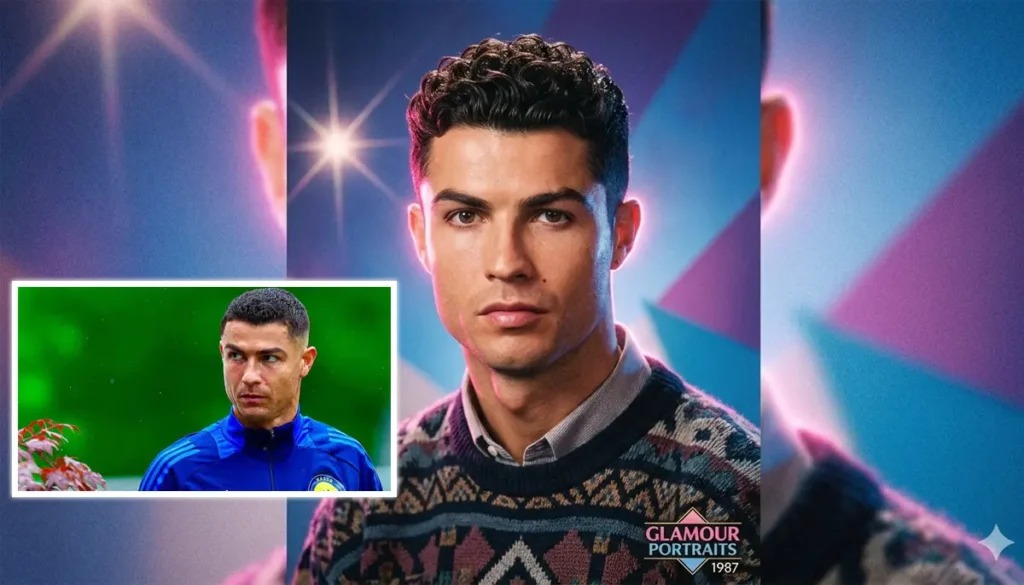
- Upload a selfie and prompt: “Turn this into a retro 80s mall portrait with perfect hair and lighting.” It keeps your face recognizable while applying the style.
- Take two product photos and say: “Combine these into one lifestyle shot on a wooden table with natural daylight.”
- For text-heavy work: “Create a poster for a coffee shop menu with the words ‘Daily Special’ in elegant script, photorealistic, warm tones.”
Users report strong results with character consistency—great for series of images featuring the same person or object across different scenes. One common test: Upload a photo of yourself and ask for “impossible” variations like different hairstyles, outfits, or settings while keeping your features intact.
Main Use Cases and Applications
Nano Banana AI shines in scenarios where precision and iteration matter more than wild artistic experimentation.
Personal and Creative Use:
- Fun photo transformations (e.g., turning family pics into stylized art or figurines).
- Custom avatars, social media content, or greeting cards.
- Quick visualizations of home decor ideas or outfit mockups.
Professional and Business Applications:
- Marketing teams create product mockups, social ads, or A/B test visuals in minutes.
- Designers generate storyboards, infographics, or branding assets with accurate text and consistent elements.
- Educators or content creators build diagrams, recipe visuals, or explanatory images grounded in real facts (e.g., a step-by-step plant care guide).
Specialized Tasks:
- Video pre-production (storyboards with consistent characters).
- E-commerce (product photos with varied backgrounds or lighting).
- International campaigns (accurate multilingual text on packaging or posters).
It also supports advanced controls like changing aspect ratios without losing key details, applying specific lighting effects (day to night, depth of field), or creating surreal but logical composites.
Advantages of Nano Banana AI
- Strong editing and consistency Excels at preserving characters, objects, and scenes across edits—often better than competitors for multi-image workflows.
- Iterative chatting feels natural and reduces prompt engineering frustration.
- Flash version is fast; basic use is free via Gemini.
- Incorporates knowledge for accurate details (recipes, locations, science).
- Pro version produces legible, expressive text in many languages.
- SynthID watermarks promote transparency.
In practice, it’s reliable for non-artists who just need “good enough” professional results quickly.
Disadvantages and Limitations
No tool is perfect. Here’s a balanced view:
- Best results (especially Pro) require a Google AI subscription. Free tier has rate limits and may use the lighter model.
- Not fully open or customizable You can’t fine-tune it like open-source options (e.g., Stable Diffusion).
- High-quality outputs can blur lines between real and AI-generated photos, raising deepfake concerns in sensitive contexts.
- Complex multi-character scenes or very specific artistic styles may still need multiple tries.
- Like all generative AI, it refuses certain prompts (violence, explicit content) and may reflect biases in training data.
- Dependency on prompts While forgiving, vague instructions yield average results.
- Availability Limited to countries where Gemini is supported; outputs are experimental and can vary.
It’s not a full Photoshop replacement—it’s better for quick ideation and edits than pixel-perfect retouching.
Comparison with Similar Tools
| Tool | Strengths | Weaknesses | Best For |
|---|---|---|---|
| Nano Banana AI | Excellent editing/consistency, conversational, real-world knowledge, fast Flash mode | Tied to Gemini/subscription for Pro | Iterative edits, practical visuals |
| DALL-E (OpenAI) | Strong creative prompts, good text, integrated with ChatGPT | Less emphasis on multi-image consistency | Standalone creative generation |
| Midjourney | Artistic styles, community features | Discord-based, steeper learning curve | High-end artistic images |
| Adobe Firefly | Seamless Photoshop integration, commercial-safe training | Requires Creative Cloud subscription | Professional design workflows |
| Stable Diffusion (local) | Fully customizable, private, no limits | Needs technical setup/hardware | Advanced users wanting control |
Nano Banana stands out for users already in Google’s ecosystem who value editing over pure generation. It feels more “practical” than Midjourney’s artistic bent and more conversational than DALL-E’s one-shot approach. Compared to Firefly, it’s faster for non-designers but lacks the same deep integration with pro design software.
Prompt for AI image generation
Scenario 1: Small Business Marketing
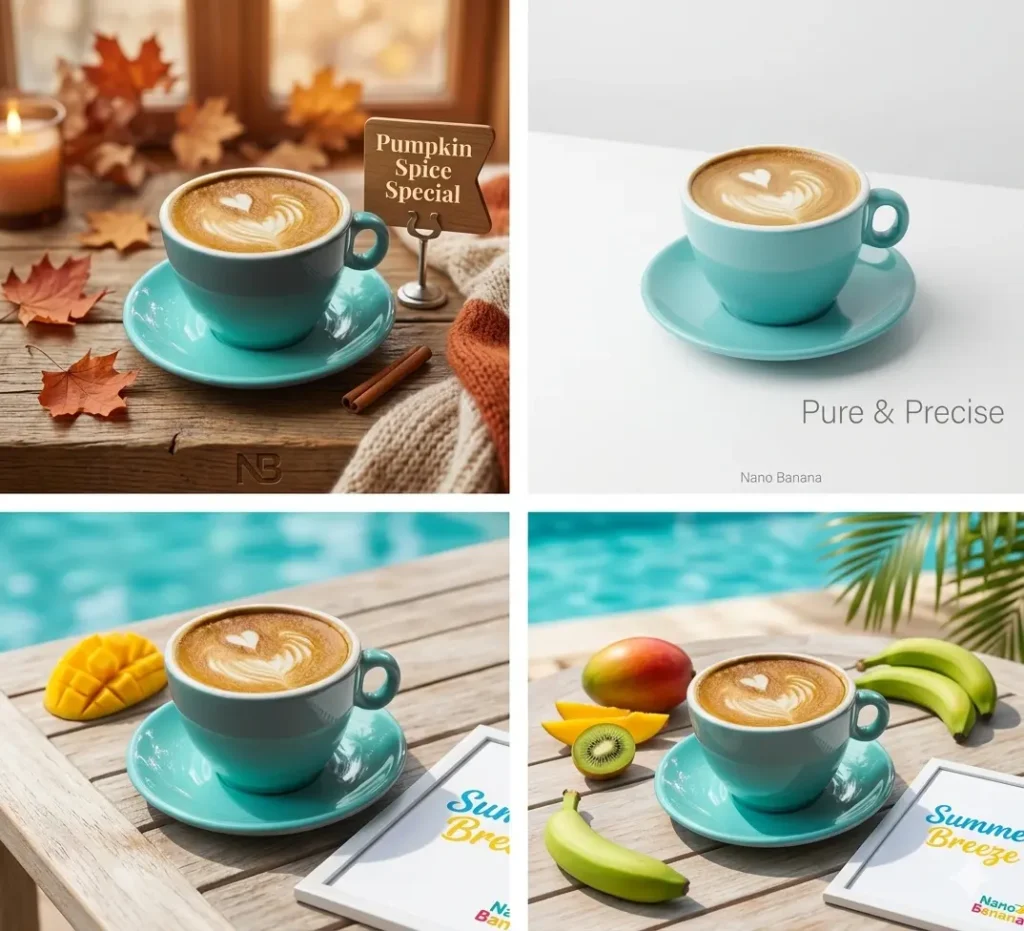
A café owner uploads a product photo of a latte and prompts: “Create three variations for Instagram: one with cozy autumn background, one minimalist white, one vibrant summer.” Nano Banana delivers consistent cups with accurate text overlays like “Pumpkin Spice Special.” Total time: under 10 minutes. Result: Ready-to-post assets without hiring a photographer.
Scenario 2: Personal Project – Family Memory Book
Upload old photos and request: “Restyle these as 90s yearbook portraits while keeping faces identical.” Or combine family group shots into one cohesive holiday card scene. The consistency keeps everyone recognizable.
Scenario 3: Freelance Designer Workflow
A graphic designer needs a storyboard for a client video. They upload character references and prompt for sequential panels with specific camera angles and lighting. Pro mode handles up to 14 consistent elements, producing a clean black-and-white sketch series for approval.
Scenario 4: Educational Content
A teacher creates an infographic: “Make a step-by-step guide to making Elaichi Chai using real recipe details.” The model pulls accurate steps and visualizes them clearly.
These examples show how the tool fits into real workflows rather than replacing skilled professionals—it augments them by handling the repetitive or experimental parts.
Google Gemini Subscription Plans (2026)
| Subscription Tier | Monthly Price (USD) | Storage Included | Key Features & AI Capabilities |
| Gemini Free | $0.00 | 15 GB | Access to Gemini 2.5 Flash / Limited Gemini 3.0 Pro/ Nano Banana |
| Google AI Plus | $7.99 | 200 GB | Expanded access to Google AI, priority during peak times / Nano Banana |
| Google AI Pro | $19.99 | 5 TB | Gemini 3.0 Pro, Gemini in Workspace (Docs, Gmail), Gemini Live / Nano Banana |
| Google AI Ultra | $249.99 | 30 TB | Gemini 3.1 Ultra, Highest reasoning power, advanced coding & data / Nano Banana |
When (and When Not) to Use Nano Banana AI
Nano Banana AI is worth using when you need fast, consistent image edits or generations that feel grounded in reality. It’s ideal for hobbyists, marketers, educators, or small teams who want professional results without learning advanced software. If you’re already using Gemini for chat or research, the seamless integration makes it a no-brainer for visual tasks.
Skip it (or use sparingly) if you need maximum artistic freedom, full offline/privacy control, or pixel-level precision—traditional tools or open-source alternatives may serve better. Also avoid it for sensitive or misleading content, as the realism can amplify ethical risks.
In the end, Nano Banana represents a maturing phase of AI imaging: less about “wow” factor and more about practical utility. It won’t replace human creativity, but it can save hours of tedious work and spark ideas you might not have visualized otherwise. Give the free version a try in Gemini—start simple, iterate in chat, and see what fits your needs. Like any tool, its value comes from how thoughtfully you apply it.
Advantages
- Excels at precise editing while maintaining perfect consistency across faces, bodies, lighting, and details in multi-step modifications.
- Supports natural conversational workflow, allowing iterative refinements without rewriting prompts from scratch.
- Combines high speed in Flash mode with advanced accuracy and multilingual text rendering in Pro mode.
- Leverages real-world knowledge to generate logical, context-aware images rather than purely random creations.
- Freely available in the Gemini app, with optional paid upgrades for faster and higher-quality output.
Limitations
- Fully tied to Google’s ecosystem and requires a subscription for access to Pro features.
- Closed-source with no option for local installation, customization, or offline use.
- Can produce highly realistic images, increasing the risk of misleading or deceptive content.
- May require multiple refinements for highly complex scenes or very specific artistic styles.
- Subject to Google’s content policies, which strictly limit or reject certain topics.
💡 Expert Opinion
"AI Image Generator"
Similar AI Tools

Kling AI Review 2026 – What It Actually Delivers for Video Creators

Seedance 2.0 AI Review What the AI Video Creation Platform Actually Delivers in 2026

Runway Gen-3 Alpha Review 2026 What It Actually Delivers and Where It Costs You
